Veränderungen des Inhalts
Klicken Sie für eine detaillierte Beschreibung auf die geänderten Stellen:
Benutzen sie die linke oder die rechte Maustaste, um zur jeweils vorherigen bzw. nachfolgenden Änderung zu gelangen.
It is always possible to query persons, where In principle, persons can always be queried wherever the overview list of persons is used to search for a person.
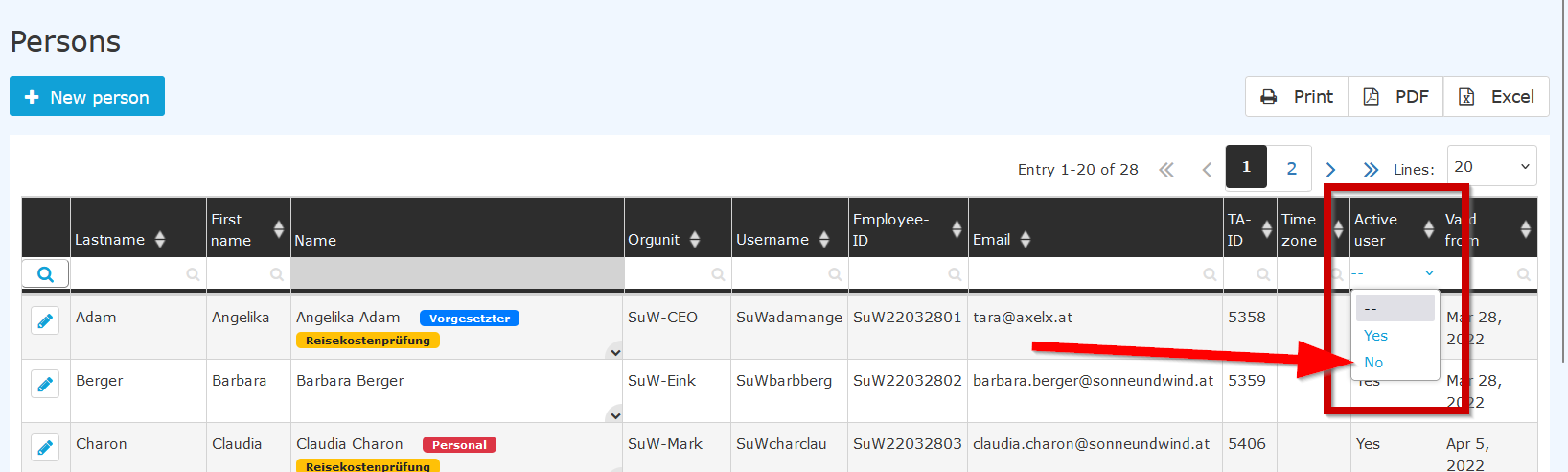
This overview list also offers the option of displaying inactive persons:
In this table, there is This table contains a column labeled “Active user”. The default "Active user". By default, the selection here is “set to "--”", meaning that so all employees are displayed, regardless of their activity status as a user.
Clicking on the arrow opens the selection list, and you also have the option of selecting “inactive”can also select "inactive".
--> The list of inactive users is now displayed.
This option for selecting inactive persons is offered in the following functions:
This gives you several options for retrieving personal querying the person data, as well as data from the time recording tracking of inactive employees.
Keywords: ex-employee, resignationtermination, parental leave, inactive

 erste
erste


 Vergleiche Versionen 1 und 2
