Veränderungen des Inhalts
Klicken Sie für eine detaillierte Beschreibung auf die geänderten Stellen:
Benutzen sie die linke oder die rechte Maustaste, um zur jeweils vorherigen bzw. nachfolgenden Änderung zu gelangen.
General
For decision - makers (managerssupervisor, personnel), this menu item is used to process assigned requests.
Example: Person A is the manager supervisor of person B. Person B makes a Time Correction requestsubmits a time correction request. Person A sees this request under the menu item Open ToDos (tasks, since person A must approve or reject person B's request). (Person B sees the request under the menu item Uncompleted requests. Open requests.)
A new feature as of November 2023 prevents a task from being processed by two or more responsible persons at the same time. If one person has opened a task, the second person is notified, or opening is blocked, as soon as they click the task.
There are 4 options to choose from when processing applicationsrequests:
-
 Approve Check mark - to approve the request
-
 Deny Stop - to reject the request
-
 Comment Price tag - to add a comment - see below
-
 Print Printer icon - to create a version optimized for print output with all the information related to the request
Depending on your role function and permissions within the system, not all options may be available to you. For example, the "Approve" option will only appear appears for supervisors who are authorized to approve leave vacation requests.
Example of open tasks as they appear for a supervisor:
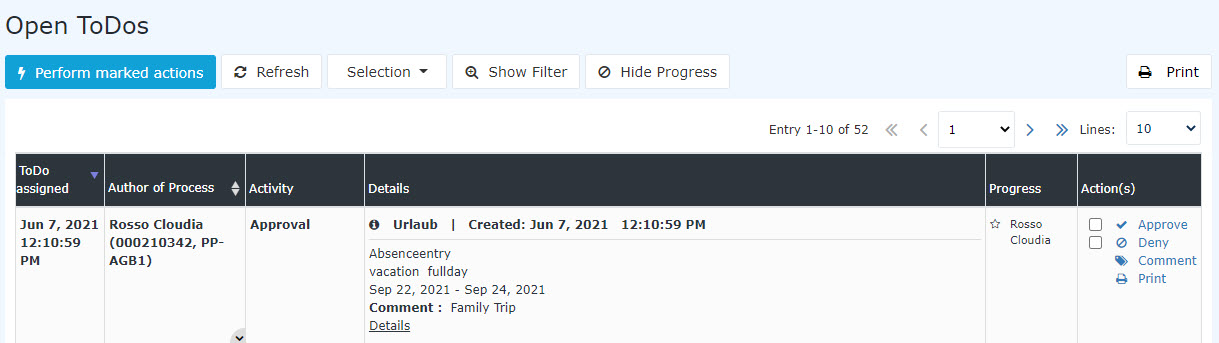
After clicking Approve or Reject, the request disappears from this view and is moved to the Completed ToDos view. A more detailed description of two additional features can be found under the topics Filtering and Process the finished tasks view.
Further information is available on using the filter and on displaying the details.
Practical function: Leave a comment
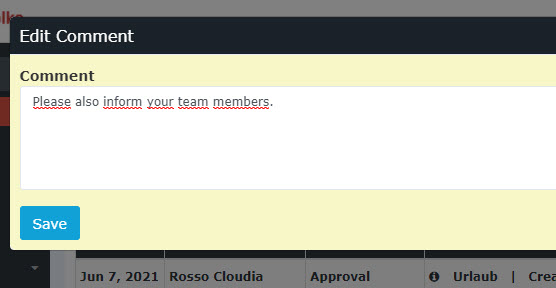
Commenting
This is what the comment looks like after saving:


 erste
erste


 Vergleiche Versionen 17 und 18
