Veränderungen des Inhalts
Klicken Sie für eine detaillierte Beschreibung auf die geänderten Stellen:
Benutzen sie die linke oder die rechte Maustaste, um zur jeweils vorherigen bzw. nachfolgenden Änderung zu gelangen.
Under this menu item, decision makers (supervisor, personnel) can get an overview of the requests they have processed / completed.
The view is essentially the same as that of Open tasks, with the difference that finished tasks only shows completed requests that can no longer be processed further. This view is an archive that serves solely to document the finished tasks.
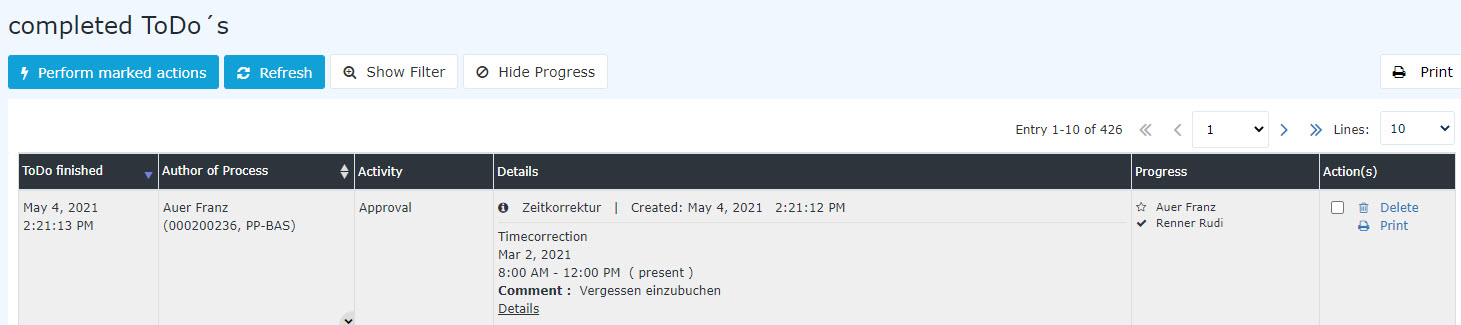

In the screenshot above, you can see
- when the requests were completed (Task finished)
- who the requester (Auer FranzAdam Angelika) was and which department / group (PPSuW-BASMark) he she belonged to (Requester)
- which activity the request was for (approval, i.e., a request requiring approval) (Activity)
-
that these were time correction / special absence requests what type of request it was (absence, special absence, vacation) (Details)
- that Auer Franz Adam Angelika was the requester in all cases (star
 icon) and that Renner Rudi rejected Sonne Susanne commented on and approved them the requests (History)
For more information, see the chapters Using the filter and Displaying process details.
Additional function of the details view
You can open a new form for the specific absence reason (in this case a vacation request) directly from the process details view.
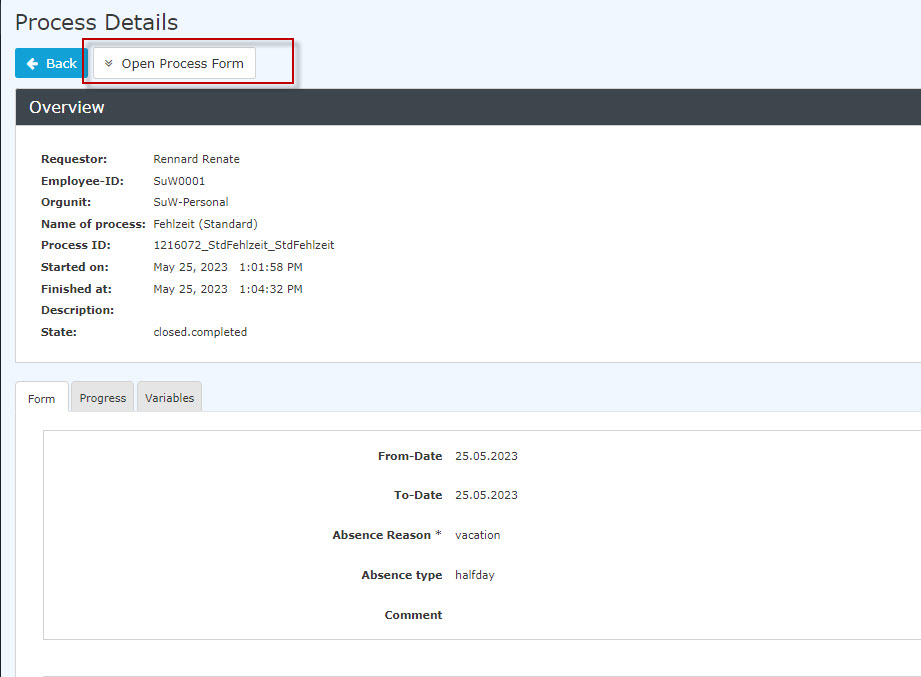


 erste
erste


 Vergleiche Versionen 6 und 7