Veränderungen des Inhalts
Klicken Sie für eine detaillierte Beschreibung auf die geänderten Stellen:
Benutzen sie die linke oder die rechte Maustaste, um zur jeweils vorherigen bzw. nachfolgenden Änderung zu gelangen.
General
Definitions of terms
This page describes the basic terms relating to roles. You can find information on editing roles under "Create and edit role assignments".
Role
A role describes a specific function within a company (superiorsupervisor, personnel).
A role in the Personalwolke Personalwolke essentially serves 2 functions:
- On the one hand, access authorizations permissions for individual program functions are realized using implemented via roles.
- On the other hand, they fulfill certain functions in the workflow flow (for example Supervisor: Approval of leave process (e.g., supervisor: approving vacation requests, personnel: Views of reviewing sick leave notifications)
In the Personalwolke there are two
Personalwolke has 2 predefined roles that can be assigned to individual persons or groups:
Manager
Supervisor and Personnel
Supervisor
- As the name suggests, this role is used to grant a person or group certain extended rights to approve or reject requests made submitted by employees (vacation, doctor, time compensationoff in lieu, etc.).
-
The "Supervisor" function relates to the organizational unit/group
Personnel
- This role helps you evaluate with reporting on employees. Various evaluations reports can be created for on different topics (accounts, sick days, holidaysvacations, statistics, attendance, etc.).
You assign the role either using the role itself, the
-
The Personnel function relates to the members of permission groups, especially to all employees (XXX-ALLE)
-
The Personnel role is a prerequisite for using the menu item Time management/Correction client. Only this role can change bookings here, so at least one employee per company must be given this role!
The role is assigned either via the role itself, via the person master data sheet, or a groupvia a group, see the chapter Create and edit role assignments.
The role also performs fulfills certain functions during in the process flow (requests). Here , the role holder can set perform defined activities, such as approving, rejecting , or viewing reviewing a request (see open tasks).
In contrast to organizational structures (groupsorganizational units, loose permission groups), a role cannot be evaluated (e.g. for the creation of used in reports in Personalwolke Time or HR-Expert). This means that no information functions of a role can be taken into account when querying information is queried. To make this possible, the role holders would have to be combined in a loose permission group (for examplee.g., a loose permission group of superiors Supervisors to which all holders of the role managers Supervisor are added).
Competence target
A competence target is defined understood as a person or group for which the role holder is responsible or which they may be inspected. Here there view.
There are 3 possibilitiesoptions here: certain specific PERSON(s), certain specific GROUP(s) (both organizational units and permission groups) or CLIENT. A simultaneous assignment of several competence goals is possible.
Assignment of a role to a person
You can assign a role to an employee by choosing Roles in the menu.

To assign a role, simply click on the edit icon. In the following overview, you will find a list of the competence goals and role holders of the selected role.
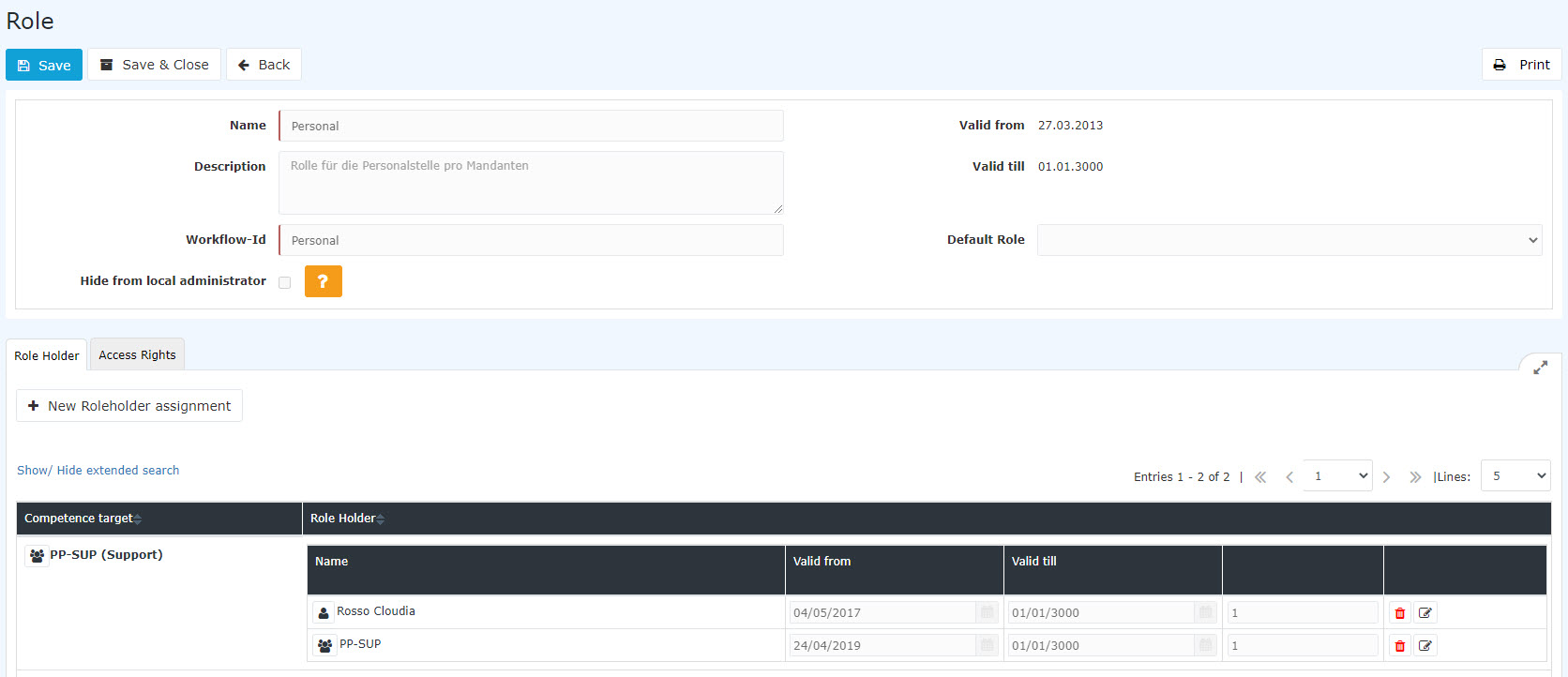
In this example, it can be seen that the PB-SUP group performs the role of personnel for the person Honig Helga, i.e. all persons assigned to the PB-SUP group perform the role of personnel for the person Honig Helga. In addition, one sees that the person Gschaftig Gunter takes over the role personnel for the entire enterprise (client) Personalwolke Base.
With a click on New Role Holder, the selected role can be assigned to new persons / groups.

-
Competence target refers to the person / group for which the employee is to be responsible. In addition, it is also possible to select a client, whereby client refers to the entire company.
-
The role holder can be a person or a group.
-
Valid from / Valid to describes the period in which the employee is assigned the selected role.
-
The order determines the deputy (order 1 = superior, 2 = deputy, 3,4 = if several persons are defined as deputies, the system determines who receives an application for processing).
Practical functions
-
When assigning a new role to a person/group/client, there is also the option of using an AutoComplete function. This function is activated by starting to type in an empty text field where, depending on the selected competence target / role holders, corresponding options are displayed or, if only one option exists, it is selected immediately.
-
We select competence target "Group" and enter "PP-" in the newly appearing text field. While you are still typing, a list of options appears from which you can choose. The arrow keys can be used to scroll through the list of results or to select a suggestion with the mouse.
-
We select the person as the role holder and type "Ren" in the input field. Since there is only one employee whose name begins with "Ren", the AutoComplete function immediately writes the entire name into the field.
A click on Save stores the settings.
Several competence targets can be assigned at the same time, see Create and edit role assignments
Deputy
In the workflow, the term deputy is not used in the hierarchical sense, but refers to the permission an employee receives from another employee to process that employee's workflow tasks.
Two steps are required for this:
1. The person who is to act as deputy must have been assigned number 2 in the sequence in the role assignment
2. The person who wants to be represented by another must activate approval by the deputy in the settings, see "Settings"
The role assignment is described in Create and edit role assignments.
The deputy's permission is set in the settings under "Deputy" and is described under "Settings".
Role badges
Role badges make it easier to recognize certain roles in the persons overview

The following roles are marked by badges:
-
Supervisor

-
Personnel

-
Travel expense review

The badges appear automatically in the persons overview as soon as an employee has received or inherited a role. They cannot be changed.

 erste
erste


 Vergleiche Versionen 10 und 11