Veränderungen des Inhalts
Klicken Sie für eine detaillierte Beschreibung auf die geänderten Stellen:
Benutzen sie die linke oder die rechte Maustaste, um zur jeweils vorherigen bzw. nachfolgenden Änderung zu gelangen.
General
To switch to another user as an administrator, first click on your name in the upper right corner and then on "Switch user".
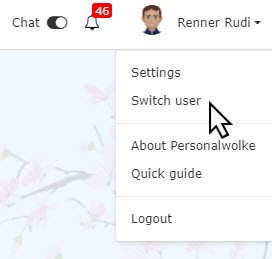

An alphabetical list of all available employees appears in the workspace. Click on the desired employee to go to that person's Personalwolke start page.
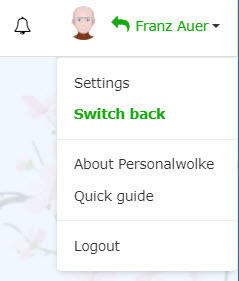
The name of the "switched" user appears on the right in the title bar in green - this indicates that you are logged in with administrator rights and that the user has only been switched.
To switch back to the original user, click on the name and then on "Back to original user".

It is possible that certain actions cannot be performed for switched users, for example to prevent intrusions into privacy. These settings can be defined when configuring the respective action. If you would like changes to be made, please contact the Workflow team.

 erste
erste


 Vergleiche Versionen 6 und 7