Veränderungen des Inhalts
Klicken Sie für eine detaillierte Beschreibung auf die geänderten Stellen:
Benutzen sie die linke oder die rechte Maustaste, um zur jeweils vorherigen bzw. nachfolgenden Änderung zu gelangen.
General
The organizational chart provides an intuitive and convenient way to edit (delete, move) groups (departments) within the company hierarchy.
IMPORTANT: Adding / removing a PERMISSION GROUP (formerly loose group) is NOT possible via the organizational chart! For this use case, please proceed as described under Move employees to another department or or Add employees to a group.
Procedure
In the menu tree under Administration, select Organizational chart. In principle, it is not necessary to change any settings here for this use case.
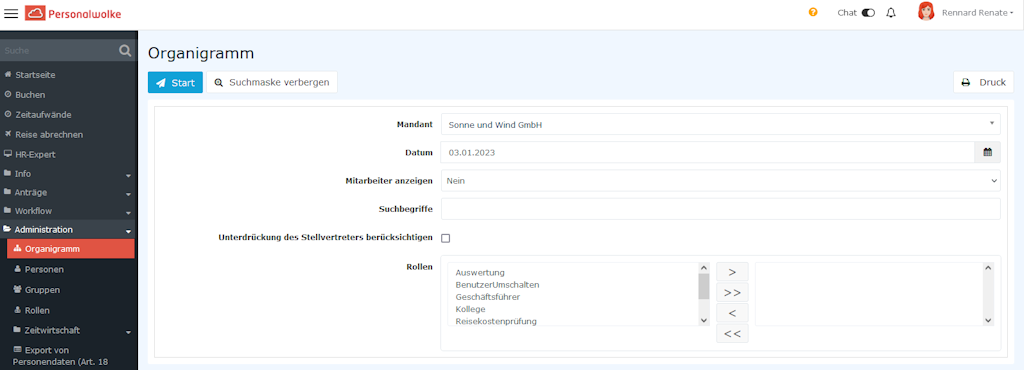
Clicking Start generates the organizational chart.
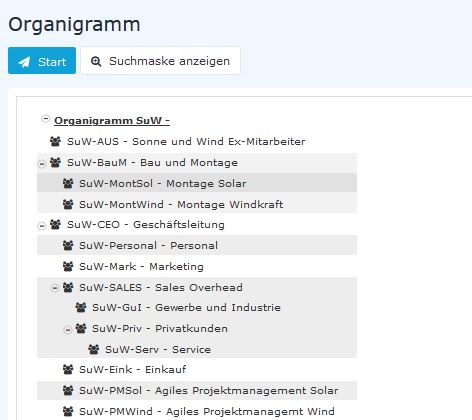
ATTENTION: It is important to understand that when a group is moved, all subgroups of that group are automatically moved as well.
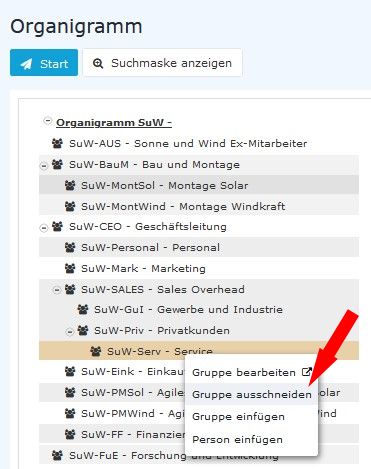
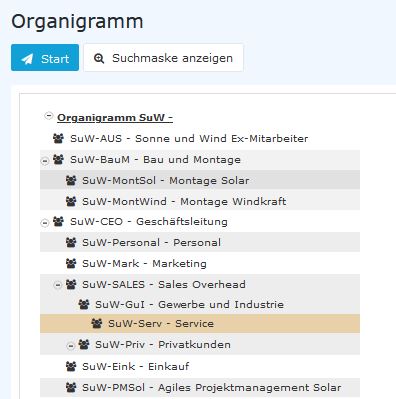
Let us assume that we now want to define the group SuW-Serv as a subgroup of the group SuW-GuI. To do this, we proceed as follows:
Right-click the group SuW-Serv and select Cut group...
... now right-click the group group SuW-GuI and and select Paste group ...
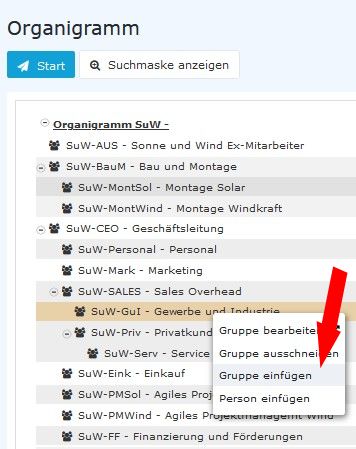
... the result is immediately visible.
To change the group name and other properties of the group, simply select the entry Edit group. You are then automatically taken to the group management view (see FAQ: Change short name / name of a group).
Additional information
You can find more information on the topic of groups at this link: Groups
You can find more information on the topic of the organizational chart at this link: Organizational chart

 erste
erste


 Vergleiche Versionen 5 und 6