Veränderungen des Inhalts
Klicken Sie für eine detaillierte Beschreibung auf die geänderten Stellen:
Benutzen sie die linke oder die rechte Maustaste, um zur jeweils vorherigen bzw. nachfolgenden Änderung zu gelangen.
General informationInformation
This menu option item gives the user an overview of his or her planned or settled trips and trips awaiting settlement, along with their position in the workflow, within the period defined by hima period the user defines. The trips are listed here chronologically here with their most important data. Using the search maskform, these trips can be sorted and searched according to by various criteria.
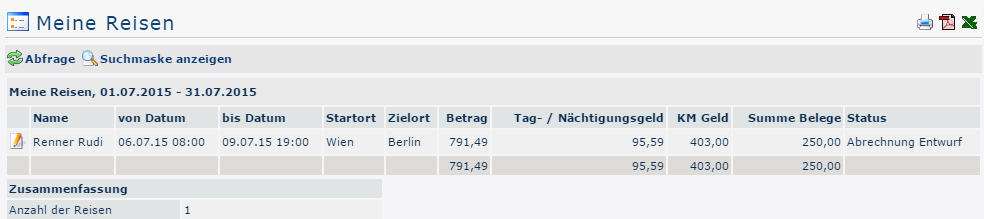
The search maskSearch Form
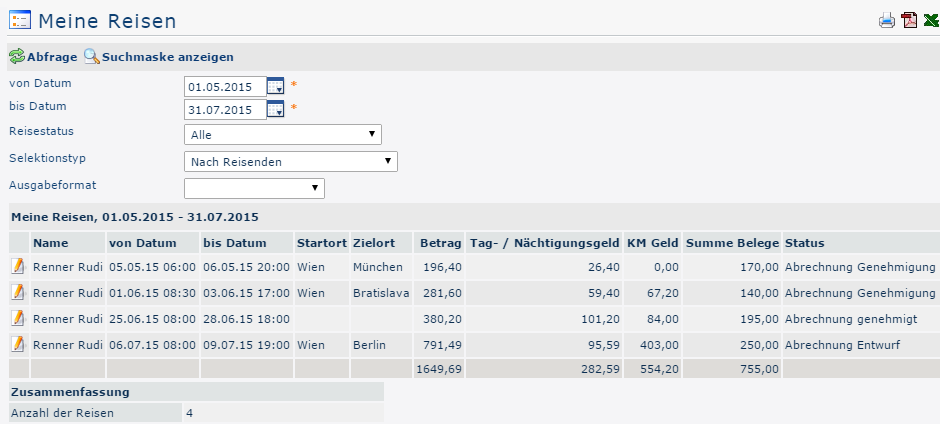
from From and to date
These parameters are used by With these parameters, the user to set sets the time period to be queried. This can be done both by direct input (in You can do this either by entering the dates directly (in the format dd.mm.yyyy format) and or by clicking on the corresponding day in the calendar calendar  .
.
Travel Trip status
A click on Clicking this dropdown element opens a list from which you can select the status of the travel requests / travel settlements expense reports you are looking for:
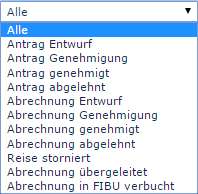
All: All trip travel requests and all trip settlements are output travel expense reports are returned regardless of their status.
Request draft: Only those trip travel requests are displayed that have been saved temporarily saved as a draft (i.e. that is, not yet in the workflow) are displayed.
Request Approval: The system displays all trip approval: All travel requests that are currently in the workflow, that is, still need to be approved, are displayed.
Request approved: If this option is selected, only requests that have already been approved are outputreturned.
Request rejected: The query result of the query outputs returns all rejected trip travel requests.
The same applies to the settlements expense reports.
Trip cancelledcanceled: Canceled or rejected trip discarded travel requests / trip settlements travel expense reports can be displayed.
Settlement Expense report transferred: This status is set as soon as the travel expenses costs have been exported from the personnel cloud Personalwolke for import into a third-party program (for examplee.g., payroll accounting).
Payroll is Expense report posted in FIBUaccounting: This is another status that can be set after the export to a third-party system.
Selection type
By travelerstraveler: Sorting is based on the name of the travelertraveler's name.
By assigned cost center: Sorting takes place is based on the basis of the cost center that can optionally be optionally stored in the business trip.
Output format
If this field is left empty, you get the output appears on the screen. Alternatively, the result can also be displayed as a print-friendly version or saved as a PDF or Excel file.
The resultResult
The following screenshot shows the result of a query from 05/01.05./2015 to 07/31.07./2015, considering taking all trip statuses into account, selected by traveller traveler and in the standard output format. With a click on  it can be printed or exported as Clicking lets you print it or export it as a PDF or Excel document.
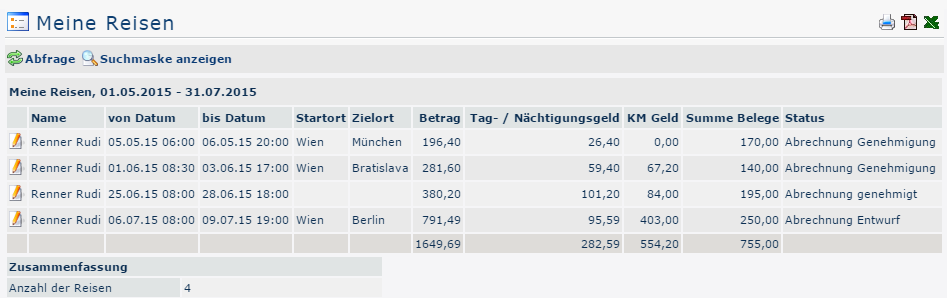
Erklärung der Tabellenspalten Explanation of the table columns:
-
Name
The name of the employee who carried out Travel Expenses prepared the travel expense report or the name of the applicant. from requester
-
From and to date Period over which
The period the trip extendscovers.
-
Starting Start location
The point from which the journey trip begins.
-
Destination Destination
The target destination of the business trip.
-
Amount
Sum of the calculated costs (dietsper diems, kilometer mileage allowances, receipts).
-
Daily allowance / overnight stay allowance In this
This column , shows the total of the daily allowance / overnight stay allowance for the specified travel period is displayed. The amount varies according to depending on the duration and the destination region.
-
KM MoneyMileage
The official mileage allowance is a lumpflat-sum payment rate reimbursement for all costs incurred by using a private motor vehicle for travel during a business tripstrip.
Car: 0,.42 Euro euros / Kilometerkilometer
Motorcycles: 0,.24 Euro / Kilometer For each passenger a euros / kilometer
A further 0.05 Euro euros / kilometer has to per passenger must be paid to the employee.
-
StausStatus
A list of all possible trip statuses and their meanings can be found above under Search mask Form -> Trip statusStatus.
-
Total receipts The
This column shows the sum of the receipts contained in the trip are totaled in this column.
-
Summary The
This shows the number of trips in that fall within the queried period is displayed here.
A click on
Clicking the edit symbol icon  opens opens a comprehensive view of all information relating to about the trip. In addition to the query data just described above, this view provides information about the composition of the individual travel expenses , it shows, among other things, how the individual travel costs are composed - in some places, comments written by the employee can are also be seenvisible. The travel trip information can also be opened in a print-friendly variant via version using the print symbol icon
  (all details are shown expanded in the following screenshot):
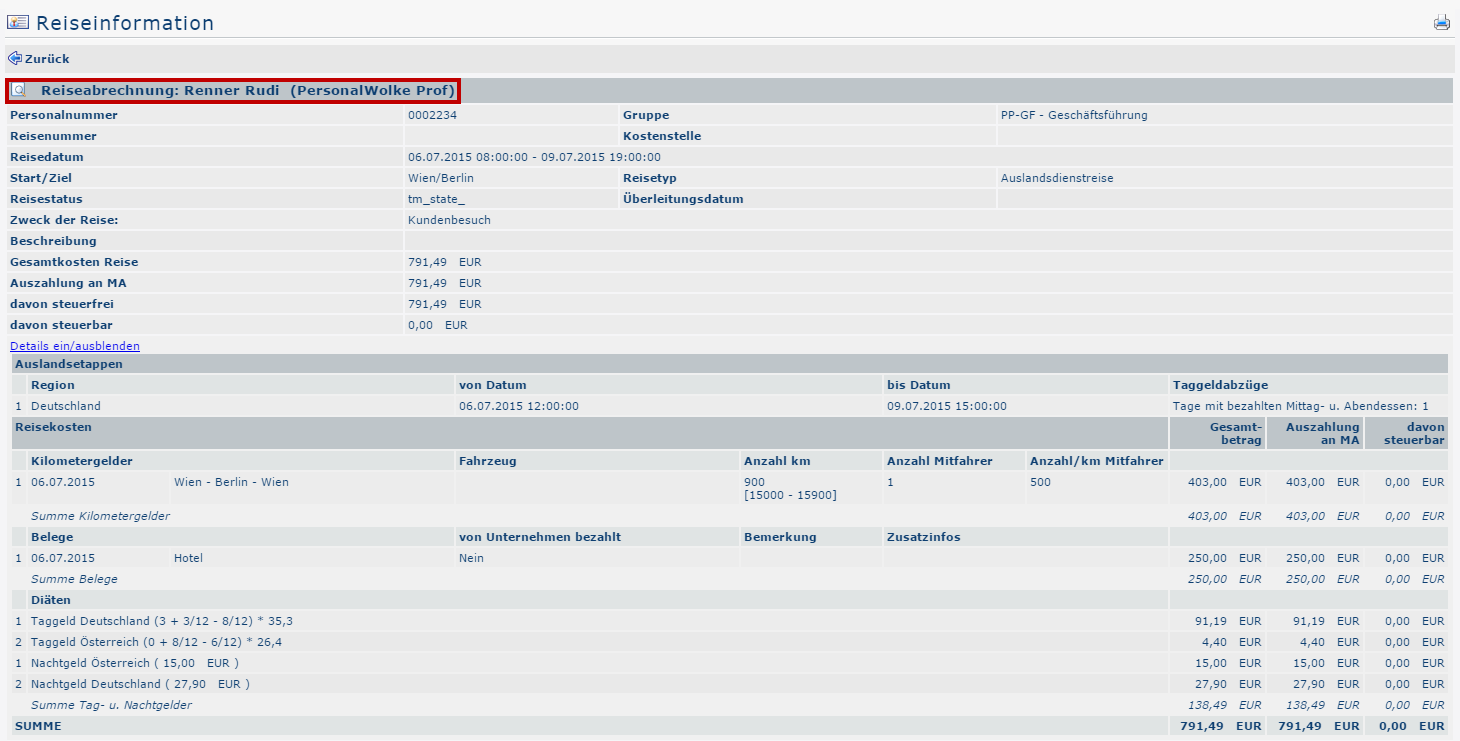
By clicking in Clicking the area framed in red , takes the user is again taken back to the view of the menu item Business trip accounting. It is possible to view Trip Expense Report. Here you can review all items of the application request / statement expense report again here, but changes are can no longer possible afterwardsbe made afterward.

 erste
erste


 Vergleiche Versionen 1 und 2
