Veränderungen des Inhalts
Klicken Sie für eine detaillierte Beschreibung auf die geänderten Stellen:
Benutzen sie die linke oder die rechte Maustaste, um zur jeweils vorherigen bzw. nachfolgenden Änderung zu gelangen.
Overview of All Travel Folders
This menu item gives users with administrator permissions (members of the loose group XX-TM-Admin) an overview of all travel folders recorded in the system for the entire company (regardless of the trip's status).
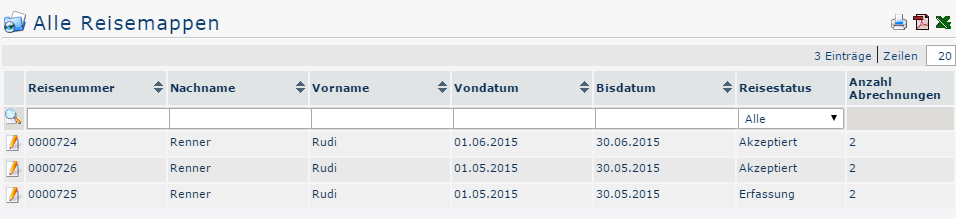
When the menu item All Travel Folders is opened, the following overview appears:

Clicking 
 lets you print this overview or export it as a PDF or Excel document.
The table columns and their functions
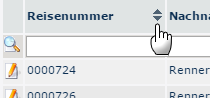
Next to most column headings there are arrow buttons that can be used to sort the displayed trips by the corresponding value, either ascending (arrow up) or descending (arrow down) / or alphabetically:

-
Trip number
The system automatically assigns a consecutive trip number to each travel folder, which you can search for here
-
First and last name
The name of the employee who created the travel folder
-
From and to date
By entering the respective dates, you can restrict the output so that only travel folders within the corresponding period are displayed
-
Trip status
The different trip statuses by which the output can be filtered here indicate the position in the workflow.
-
All
All travel folders are displayed regardless of status.
-
Entry
All travel folders that are in the respective employees' open tasks for further additions (click Edit).
-
Acceptance
All travel folders that are currently in the workflow, that is, still need to be approved, are displayed.
-
Accepted
If this option is selected, only travel folders that have already been approved are displayed.
-
Rejected
The supervisor rejected the entire travel folder, including all travel expense reports it contains.
-
Canceled
The requester canceled the entire travel folder, including all travel expense reports it contains.
-
Transferred
This status is set as soon as the travel folder, including all travel expense reports it contains, has been exported from Personalwolke for import into a third-party program (e.g., payroll).
-
Number of expense reports
Any number of travel expense reports can be added to each travel folder - the corresponding number is shown here
Trip Information
Clicking the edit icon 
 opens a comprehensive view of all information about the travel folder. It also gives an overview of all trips recorded in it. The trip information can also be opened in a print-friendly version using the print icon
 (all details are expanded in the following screenshot) :
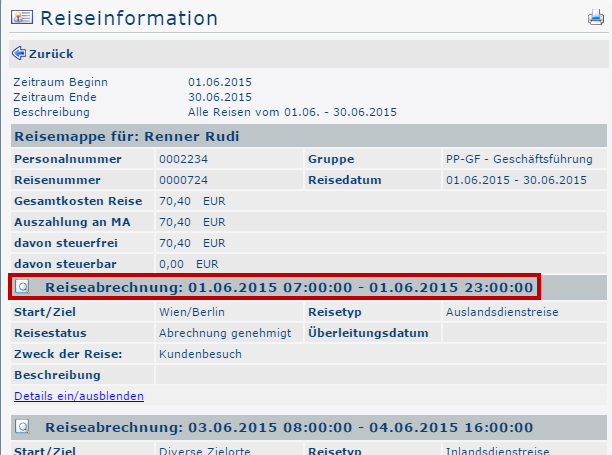

Clicking the area framed in red (in the screenshot) takes the administrator to the view the requester sees when filling out the business trip expense report or the business trip request. Here you can review all items of the expense report / request again, but changes can no longer be made afterward.

 erste
erste

 Vergleiche Versionen 2 und 3