Veränderungen des Inhalts
Klicken Sie für eine detaillierte Beschreibung auf die geänderten Stellen:
Benutzen sie die linke oder die rechte Maustaste, um zur jeweils vorherigen bzw. nachfolgenden Änderung zu gelangen.
General
When is this correction entry necessary?
1. When an employee switches from full-time to part-time or vice versa
2. When activating time tracking for an employee who already worked for the company before (beyond the reference date of the vacation assignment)
When a new employee joins, it must be decided whether it should be possible to evaluate the aliquot remaining vacation balance during the year. Likewise, it may be necessary to show the aliquot remaining vacation when an employee leaves during the year. For these two cases, logic has been implemented in the system that must be parameterized as shown in the following examples.
Note: if no evaluation of the aliquot remaining vacation balance is needed, the following steps do not have to be carried out.
The calculated values must be entered via the Correction-Client (found under Administration - Time management). A detailed description of how to enter these values can be found at the end of this document: Entry in the Correction-Client
Examples
Initial situation:
Start date of time tracking (creation of the user in Personalwolke): 01.02.2024
Vacation reference date (date on which the annual vacation is credited): every 01.01.
At the time the employee's time tracking starts, he has 5 remaining vacation days (= unused vacation entitlement) from the previous year. As of 1.1.2023, 25 days were automatically added to the employee's vacation allowance. His total vacation entitlement is therefore 30 days (see the following table).
Example 1: By the time his time tracking starts, the employee has already taken 6 vacation days. On the one hand, these are now applied to the remaining vacation of the previous year, and on the other hand, the usage not covered by the remaining vacation is deducted from the vacation allowance of the current year.
That is, these 6 vacation days are covered on the one hand by the 5 remaining vacation days from 2023, and on the other hand 1 day is already deducted from the new vacation allowance from 2024.
The remaining vacation from 2023 is thus completely used up, and 24 days of the 2024 entitlement remain (see the following table).
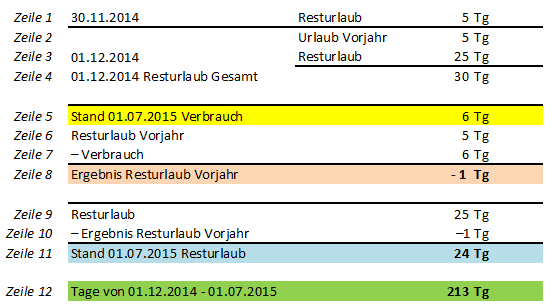

Explanation of the table contents:
-
Line 1
The remaining vacation - that is, vacation the employee has not used up - from the year 2023 (previous year) is 5 days. It is carried over unchanged into the next year.
-
Line 2 - Line 4
On the vacation reference date, here 01.12.2023, the new annual vacation / remaining vacation (25 days) is added to the remaining vacation previous year (5 days). This results in the remaining vacation total (30 days).
-
Line 5 - Line 8
On 01.07.2024, the employee had already taken 6 vacation days. When vacation days are used, they are first deducted from the remaining vacation previous year before the current remaining vacation is reduced.
As shown in line 1, 5 vacation days are left from the previous year. After deducting the 6 days taken, the remaining vacation previous year is used up, and one day more was even used, which must consequently be deducted from the remaining vacation of the current year.
-
Line 9 - Line 11
The current remaining vacation (25 days) is now reduced by the result remaining vacation previous year. Because the result remaining vacation previous year is negative in this case (-1), the new balance (on 01.07.2024) is 24 days.
-
Line 12
The number of days from 01.12.2023 to 01.07.2024 is 214.
Example 2:
By the time his time tracking starts, the employee has already taken 4 vacation days. These are now applied to the remaining vacation of the previous year. Of the 5 remaining vacation days from 2023, 1 day is left. This is added to the new vacation allowance from 2024.
The employee therefore still has 26 vacation days available for the current year (see the following table).
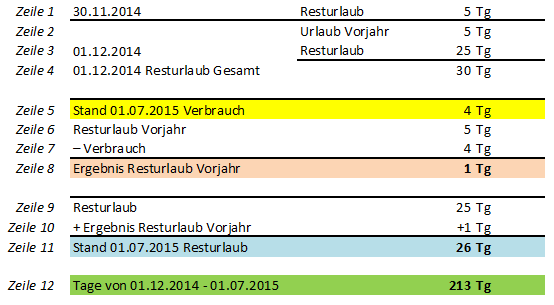

Explanation of the table contents:
-
Line 1
The remaining vacation - that is, vacation the employee has not used up - from the year 2023 (previous year) is 5 days. It is carried over unchanged into the next year.
-
Line 2 - Line 4
On the vacation reference date, here 01.12.2023, the new annual vacation / remaining vacation (25 days) is added to the remaining vacation previous year (5 days). This results in the remaining vacation total (30 days).
-
Line 5 - Line 8
On 01.07.2024, the employee had already taken 4 vacation days. When vacation days are used, they are first deducted from the remaining vacation previous year before the current remaining vacation is reduced.
As shown in line 1, 5 vacation days are left from the previous year. After deducting the 4 days taken, 1 day of the remaining vacation of the previous year is left.
-
Line 9 - Line 11
The current remaining vacation (25 days) is now increased by the result remaining vacation previous year. Because the result remaining vacation previous year is positive in this case (+1), the new balance (on 01.07.2024) is 26 days.
-
Line 12
The number of days from 01.12.2023 to 01.07.2024 is 214.
Example 3:
By the time his time tracking starts, the employee has already taken 22 vacation days.
The 5 remaining vacation days from 2023 are used to cover them. 17 days taken remain, which are deducted from the new vacation allowance from 2023.
At the time time tracking starts, the employee therefore still has 8 days of remaining vacation (see the following table)
These are now applied to the remaining vacation of the previous year. Of the 5 remaining vacation days from 2023, 1 day is left. This is added to the new vacation allowance from 2024.
The employee therefore still has 26 vacation days available for the current year (see the following table).
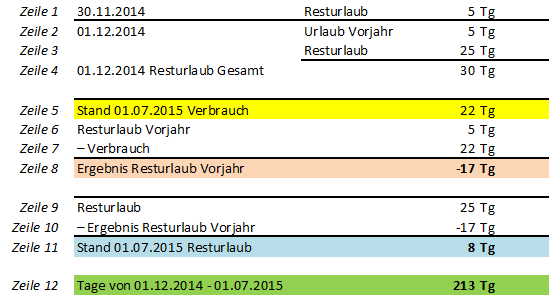

Explanation of the table contents:
-
Line 1
The remaining vacation - that is, vacation the employee has not used up - from the year 2023 (previous year) is 5 days. It is carried over unchanged into the next year.
-
Line 2 - Line 4
On the vacation reference date, here 01.12.2023, the new annual vacation / remaining vacation (25 days) is added to the remaining vacation previous year (5 days). This results in the remaining vacation total (30 days).
-
Line 5 - Line 8
On 01.07.2024, the employee had already taken 22 vacation days. When vacation days are used, they are first deducted from the remaining vacation previous year before the current remaining vacation is reduced.
As shown in line 1, 5 vacation days are left from the previous year. After deducting the 22 days taken, the remaining vacation previous year is used up, and 17 days more were even used, which must consequently be deducted from the remaining vacation of the current year.
-
Line 9 - Line 11
The current remaining vacation (25 days) is now reduced by the result remaining vacation previous year. Because the result remaining vacation previous year is negative in this case (-17), the new balance (on 01.07.2024) is 8 days.
-
Line 12
The number of days from 01.12.2023 to 01.07.2024 is 214.
Entry in the Correction-Client
How is the entry made?
In the Correction-Client, all vacation entries always refer to the year in which the date selected at the top falls.
This means that if you want to change the remaining vacation figure for the year 2024, you must select a date (the year end) in 2024.
This has the advantage that you can always specify the remaining vacation exactly as of a reference date.
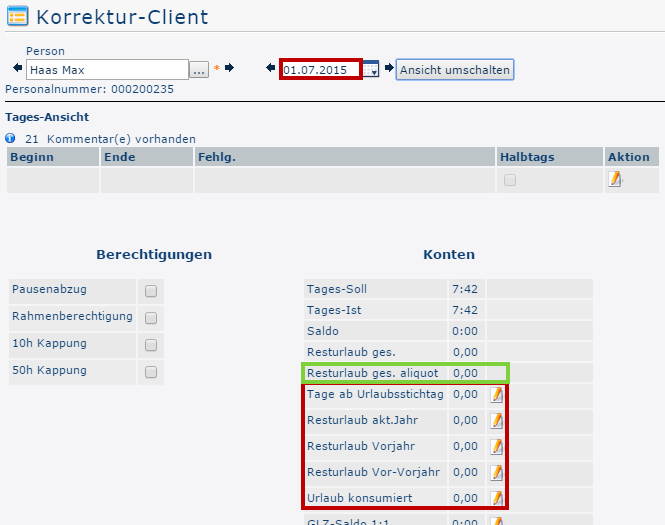

The correction is made by editing the field "Remaining vacation current year" (red arrow). Clicking the edit icon (pencil) allows you to enter a value.


With an absolute correction (=24), the number of vacation days the employee is still entitled to in the current year is entered here. This value is highlighted in light blue in the respective tables in the examples (line 11). How this number comes about is discussed in the three examples above under the respective points "Line 9 - Line 11".
The calculated aliquot remaining vacation is displayed from the day after the correction in the line Remaining vacation total aliquot (green arrow).

 erste
erste


 Vergleiche Versionen 5 und 6