Veränderungen des Inhalts
Klicken Sie für eine detaillierte Beschreibung auf die geänderten Stellen:
Benutzen sie die linke oder die rechte Maustaste, um zur jeweils vorherigen bzw. nachfolgenden Änderung zu gelangen.
In this area, a future maternity protection period or a parental leave is maintained.
Naturally, maternity protection can only be saved for a female employee. Parental leave can be saved by law for both female and male employees (paternal leave).
The maternity protection and parental leave periods are calculated according to the expected due date entered.
By checking the "Create/update employment entry for maternity protection" checkbox, they can also be automatically transferred to an employment entry.
Use cases
The following use cases exist:
- Maternity protection
- Maternity protection with subsequent parental leave
- Maternity protection with subsequent parental leave and a second part of parental leave
- Maternity protection with later parental leave
- Paternal leave (no planned date of birth, otherwise the protection periods would be checked)
For maternity protection there are
- Registration with planned date of birth
- Notification of the actual date of birth and of the circumstances determining the duration of maternity protection (multiple births, cesarean section, premature birth)
More detailed instructions can be found under Managing parental leave.
Information on the input fields can be found under Employment Field Index.
The form gives you the option to automatically create entries changing the employment state directly from the entry of maternity protection or parental leave!
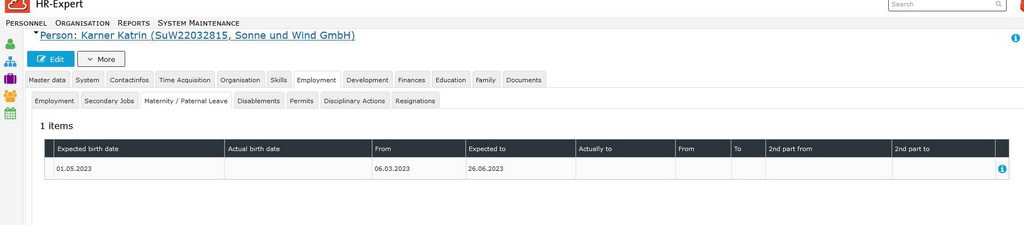
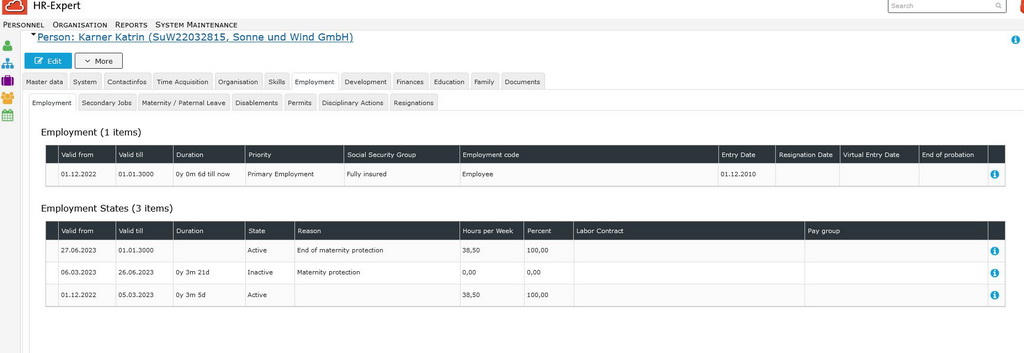
The following example shows how an expected due date is recorded (picture # 01) and how the maternity protection is automatically created in the employment states (picture # 02):
|
# 01
|
 |
|
# 02
|
 |
:



 erste
erste


 Vergleiche Versionen 8 und 9