Veränderungen des Inhalts
Klicken Sie für eine detaillierte Beschreibung auf die geänderten Stellen:
Benutzen sie die linke oder die rechte Maustaste, um zur jeweils vorherigen bzw. nachfolgenden Änderung zu gelangen.
If an employee's overtime is to be credited to the balance, this can be done via the Correction-Client .
You can find the Correction-Client in your menu tree under "Administration" --> "Time management" --> "Correction-Client".
Because the day views can be configured individually and are customer-specific, we recommend that you make these changes together with your consultant. We will be happy to help you with this.
Basics of overtime evaluation
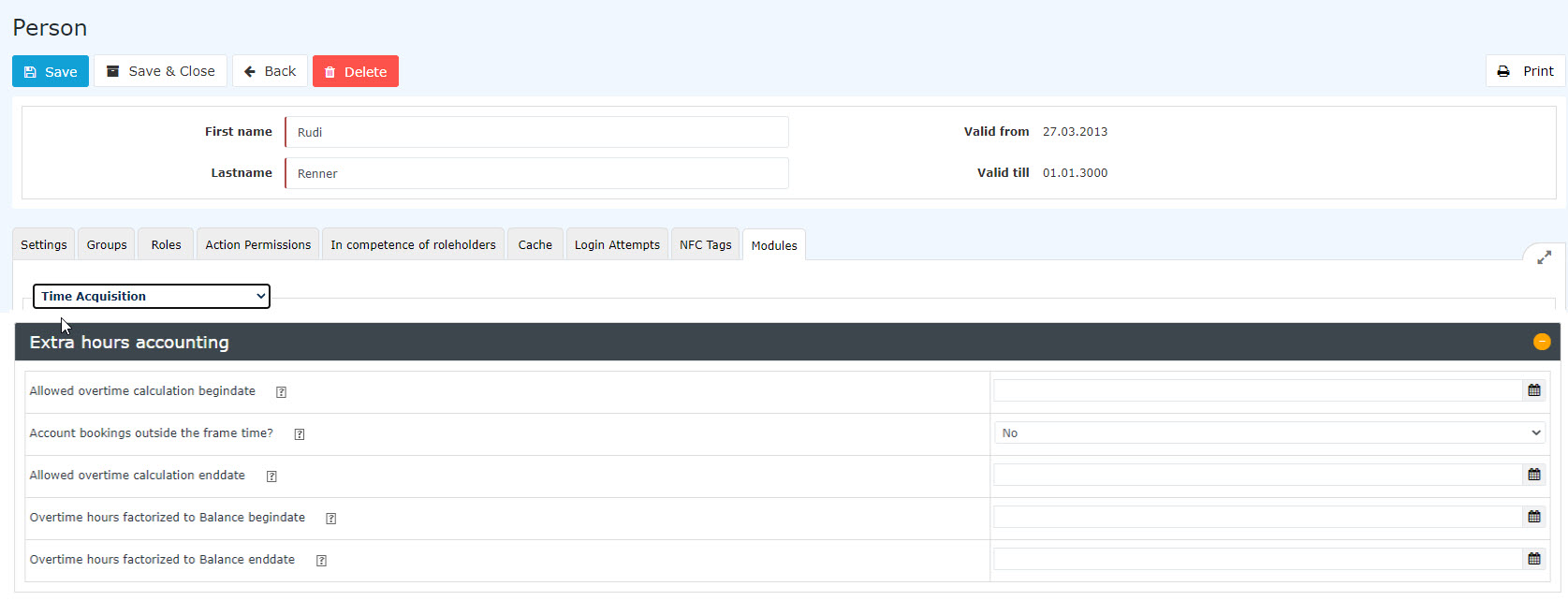
In the "Employee's master account" - "Settings" tab, the following overtime evaluation parameters should be set first.

-
Work outside the frame
This option determines whether the employee concerned is entitled to work extra hours outside the frame time. If extra work outside the frame time is not permitted but is nevertheless performed, the time that falls outside the frame time is shown as unevaluated time, which must be claimed again.
|
Option
|
Description
|
|
Yes
|
Permission to work extra hours outside the frame time
|
|
No
|
No permission to work extra hours outside the frame time
|
Example:
If the employee Claudia Charon is entitled to work extra hours outside the frame time, her 2 additional hours outside the frame time are credited normally to her hours balance. If she is not entitled to work extra hours outside the frame time, however, these 2 hours are capped and initially not shown. Claudia Charon must therefore submit a request for extra work outside the frame. If this request is approved by the supervisor, the previously unevaluated hours are credited to her balance according to the time schedule.
-
Overtime permission start
Here you enter the date from which the permission for overtime applies to the employee concerned. This means that overtime worked remains in the overtime accounts and can therefore be paid out with the defined overtime factor.
This option requires the permission for "Work outside the frame"!
-
Overtime permission end
Here you enter the date until which the permission for overtime applies to the employee concerned.
This option requires the permission for "Work outside the frame"!
-
Overtime factored to balance start
If the company decides to credit overtime not to a special account but directly to the time balance multiplied by a certain factor (e.g. x 1.5), this setting is relevant. Here you define the date from which overtime is to be credited to the time account at a factored rate.
Only takes effect if an overtime permission exists!
-
Overtime factored to balance end
Here you define the end date until which overtime is to be credited to the time account at a factored rate.
Only takes effect if an overtime permission exists!

 erste
erste

 Vergleiche Versionen 6 und 7