Veränderungen des Inhalts
Klicken Sie für eine detaillierte Beschreibung auf die geänderten Stellen:
Benutzen sie die linke oder die rechte Maustaste, um zur jeweils vorherigen bzw. nachfolgenden Änderung zu gelangen.
General
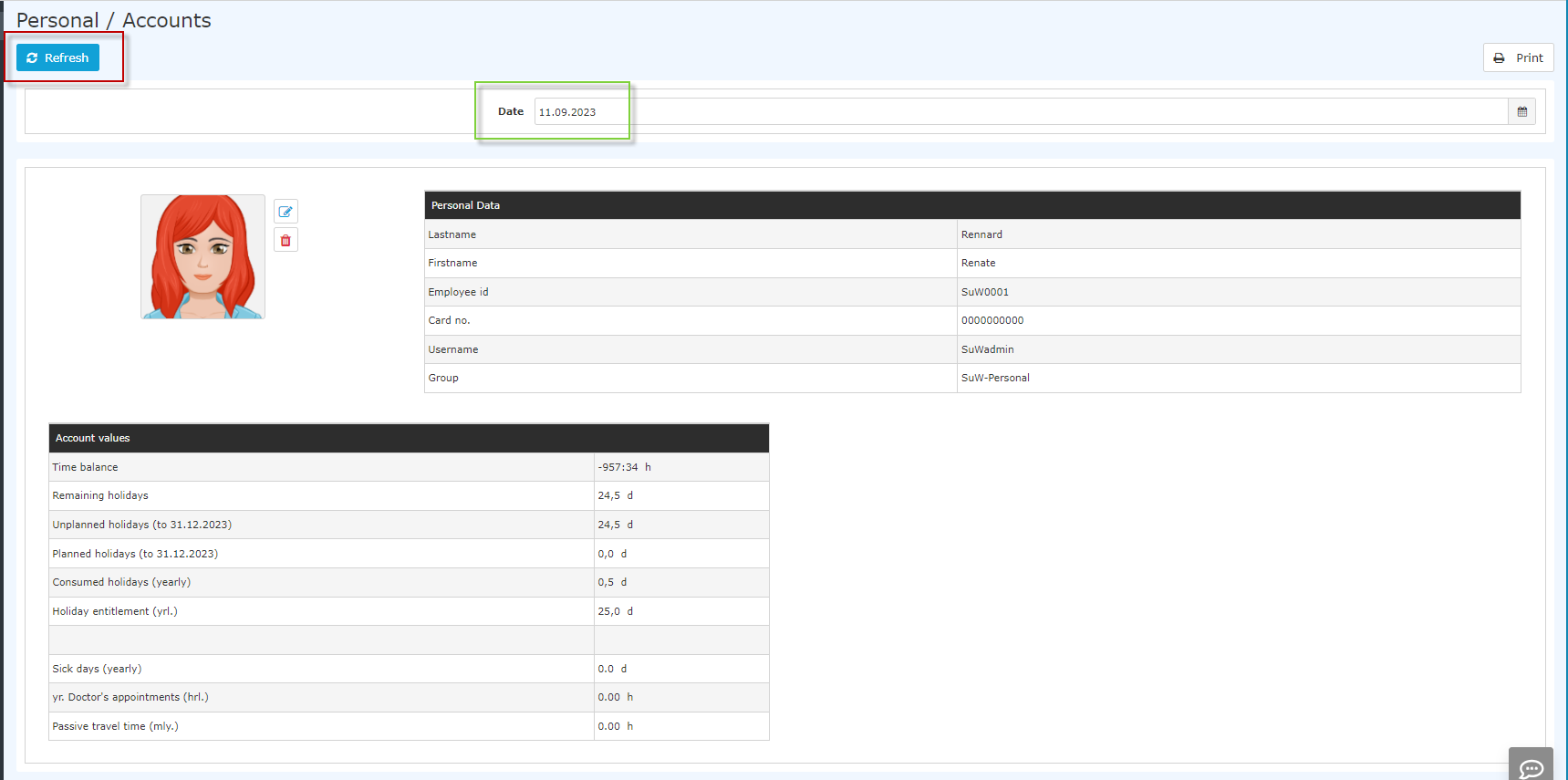
The user can use this menu option to query the This menu item lets you query your master data and the account balances balances of the your most important time recording tracking accounts for a specific key date.
In the date field (marked green), the user you can enter an alternative date (alternative key date). The date can either be entered directly in the format mm/dd.mm./yyyy (e.g.: 03.04., 04/03/2023) or selected by clicking on the calendar symbolicon. By updating Refreshing (click on clicking the "RefreshQuery" button, marked red) you will get returns the account values for the selected key date.
Personal data
In addition to general personal data such as surname last name and first name, further information is also displayed:
-
Employee ID - Personnel employee number including the fixed prefix (0001 "SuW" in this case; generallyin general: the first 4 digits characters of the employee number)
-
ID )Card card no- e.g. of ID-card or access-card Username - Login name of the employee, whereby the e-mail . - if your company has employee ID cards or similar, their number is recorded here
-
Username - login name; the email address can also be used for the login. Groupto log in
-
Department - the department to which the employee is assigned. you are assigned to
-
Annual vacation entitlement - your vacation entitlement in days
Account values
The account values provide an overview / summary of the most important time accounts for the key date selected under "Date":
Note: There may be company-specific deviations in the The list of account values shown !
Time balance
may deviate depending on your company.
-
Balance - the sum of the actual time (actual attendance) reduced by minus the target time.
-
Remaining holidays vacation - the remaining vacation currently available remaining vacation , in days
-
Unplanned holidays Unscheduled vacation - corresponds to the remaining vacation minus the planned scheduled vacation, in days.
-
Planned holidays - Planned Scheduled vacation - scheduled vacation in days
-
Consumed holidays - days of holiday already consumed
-
Holiday entitlement: days left to book
-
Vacation days taken (annual) - the vacation days already taken
-
Sick days (yearlyannual) - the annual sick days
-
Doctor's appointments visits (hrl.hrs) - the booked doctor's courses visits in hours
-
Passive travel time (mly.)monthly) - information on the time spent traveling as a passenger
Important: The values displayed values are the values for as of the selected key date!

 erste


 Vergleiche Versionen 8 und 9

