Veränderungen des Inhalts
Klicken Sie für eine detaillierte Beschreibung auf die geänderten Stellen:
Benutzen sie die linke oder die rechte Maustaste, um zur jeweils vorherigen bzw. nachfolgenden Änderung zu gelangen.
General
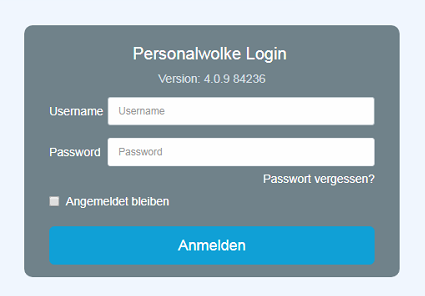
For the first login into to the Personalwolke Webdesk client, please go to the page https://personalwolke.at/webdesk3/:
Attention: the first login must take place in the browser.
It cannot be completed via the app!
-
Username - is the username you received from your administrator
-
Password - for the first login, this is the same as the user name when logging in for the first timeusername
-
Stay logged in - this option can be selected to save the login data for an automatic login in the browser
Password policies
There are a few rules to follow when choosing a new password:
- at least 8 characters
- at least 1 digitsdigit
- at least 1 special character (§,$,%,&,+,~,*,},[,...)
- at least 1 upper or lower case letter
First Login
-
uppercase or lowercase letter
First login
After the first login, the password has to must be changed:
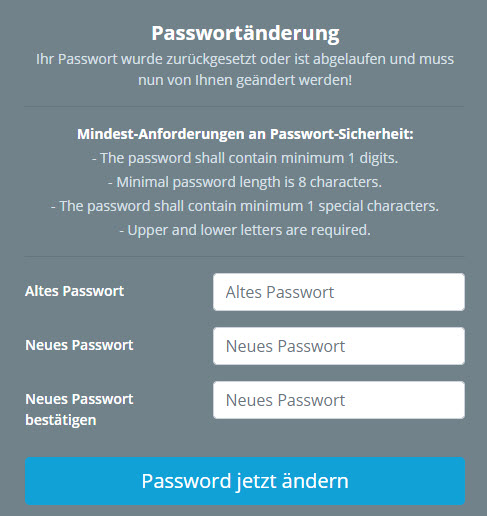
Old password: temporary password from the e-mail
New password: freely selectable according to within the following criteria below
Confirm new password: enter the same password again for checking purposes
Forget
verification
Forgot your password
Have you forgotten your login password? No problem, simply click
in your login mask on
the
button
link "
forgot
Forgot password
" and continue
?" in the login screen. Continue here --
>
>

 erste


 Vergleiche Versionen 9 und 10

