Veränderungen des Inhalts
Klicken Sie für eine detaillierte Beschreibung auf die geänderten Stellen:
Benutzen sie die linke oder die rechte Maustaste, um zur jeweils vorherigen bzw. nachfolgenden Änderung zu gelangen.
Appearance / User interface/desktop
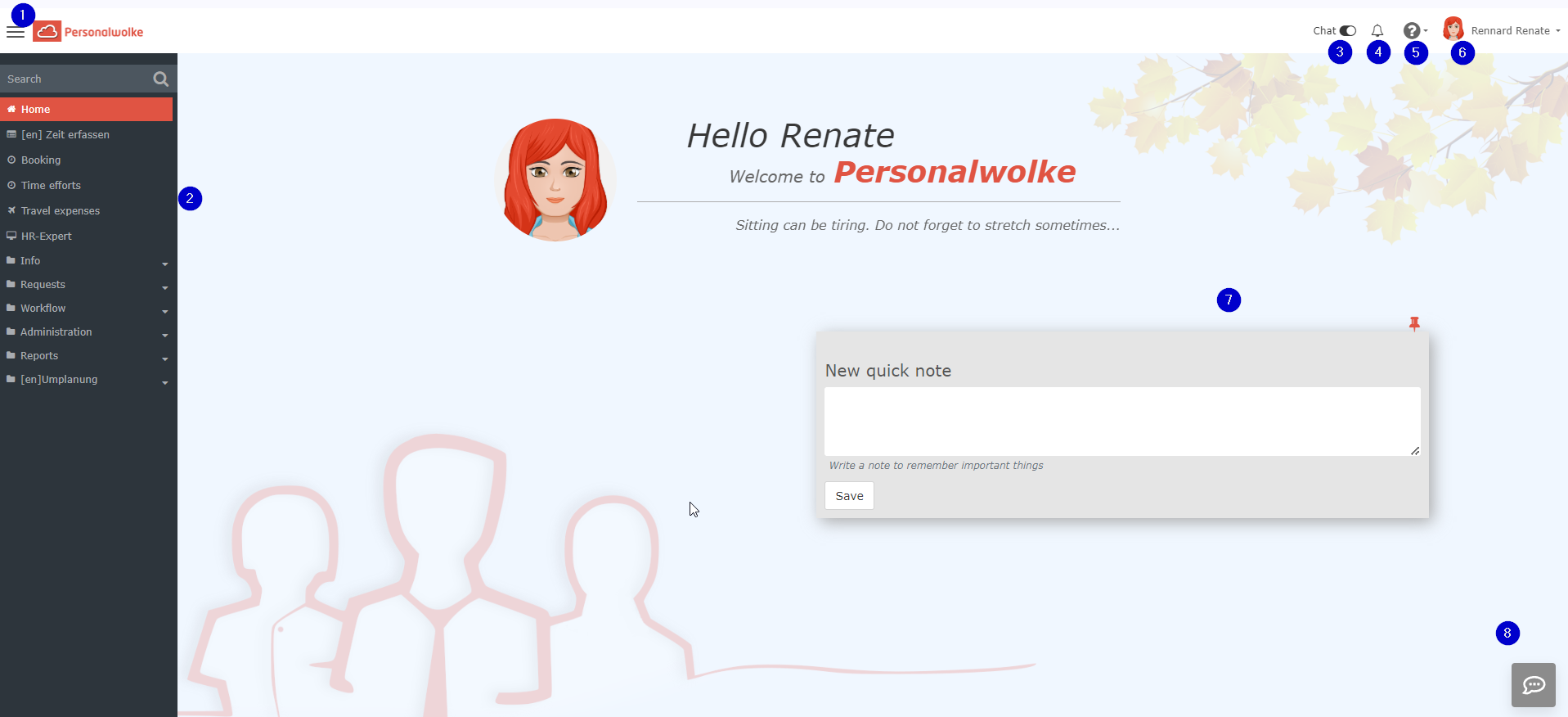
The Personalwolke welcome page has start page of the Personalwolke software is based on an intuitive and modern design , which that adapts dynamically to the type of device used (smartphone, tablet or PC). The user has the following options are available to the logged-in user on the start page.:
-
1 shows a button for quickly showing or hiding the menu bar.
-
2 shows the menu bar
Navigation bar:
-
3 + 8 show the chat function. This function is activated by default and you can use it to chat directly with one of our support staff. The "speech bubble" chat button “Speech bubble” appears at the bottom right of every page in Personalwolke. If you do not need it, slide the bar toggle to the left. This function is only available to admins
-
4 (bell) shows whether and how many new open tasks need to be completed. By clicking on the bell, you can switch directly to your open tasks.
-
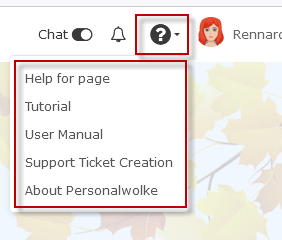
5 (question mark): Clicking on this it opens a selection menu
-
Help for this page: You will be redirected to the page in the manual on which that explains the current function is explained.
-
Tutorial [currently not yet activated across the board]: Here you will be forwarded redirected to the assistance tours
-
User manual: clicking on this will take it takes you to the start page of the manual
-
Suppor Ticket Creation of support tickets (this function is only available to admins)
-
About Personalwolke: info function about the version used, etc.
-
6 shows the name of the logged-in user (top right). Below this you will find the option to it you can change some profile settings directly, see chapter Settings.
Administrators can also have switch the option here of switching the view to that of another userhere.
-
7: The area in the middle is the notes field. System messages are displayed here.

Navigation menu
The width of the navigation menu can be adjusted individually adjusted by clicking and dragging the small white arrows on the right side edge of the navigation menu.
You can show or also hide the menu completely by clicking on  on .
Click again to show the menu once more.

 erste


 Vergleiche Versionen 11 und 12

