Veränderungen des Inhalts
Klicken Sie für eine detaillierte Beschreibung auf die geänderten Stellen:
Benutzen sie die linke oder die rechte Maustaste, um zur jeweils vorherigen bzw. nachfolgenden Änderung zu gelangen.
Practical functions
In addition, it is also possible to make
You can also submit a time correction /
absenteeism
absence request for the selected day
with a
by right-
click in
clicking the corresponding cell in the calendar.
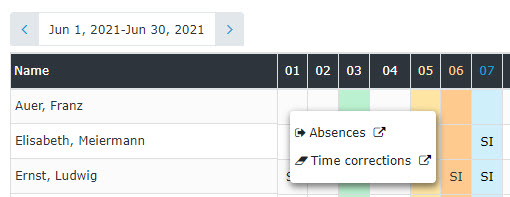
(In this example, a time correction / absence request could be submitted for 11/03)
The calendar view can also be exported as a PDF or Excel file or prepared for printing. The corresponding symbols icons (Print, PDF, Excel) are located in the upper right corner.
A list of absence reasons can be found HERE.

 erste


 Vergleiche Versionen 4 und 5

