Veränderungen des Inhalts
Klicken Sie für eine detaillierte Beschreibung auf die geänderten Stellen:
Benutzen sie die linke oder die rechte Maustaste, um zur jeweils vorherigen bzw. nachfolgenden Änderung zu gelangen.
Permission concept in Personalwolke Time is implemented by assigning of users to "loose groups". Depending on the assignment to loose groups the permissions of the users can be changed from standard time attendance (basic user interface) to additional management reports or administrator functions. The number of loose groups can be customized to special requirements of the customer. Nevertheless, every Personalwolke Time customer has to consider three types of loose groups:
Personalwolke Time:
loose group ALL
|
loose group ALL + loose group Management
| loose group ALL + loose groupe
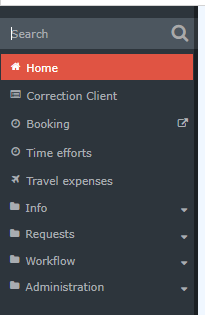
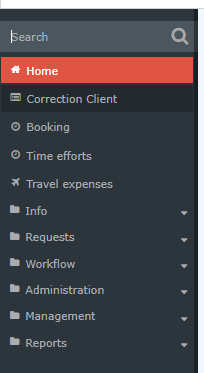
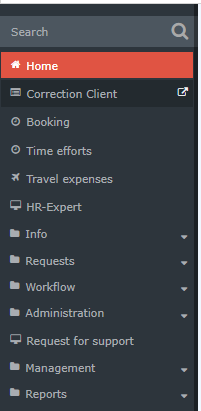
In the Time module there are basically three so-called "permission groups". Users can be added to these groups to easily obtain certain action permissions within the system, for example for classic time booking, but also for advanced management reports. The number as well as the specific group names and permissions can also vary from company to company in Personalwolke, but these three types are present by default:
Personalwolke Time:
|
Permission group ALL
|
Permission groups ALL + Manager
|
Permission groups ALL + Admin
|
|
|
|
|
|
Standard group - this group every user MUST be assigned to every user who is tracking timethis group!
|
Management Group group - Users users added to this group will see receive additional menu items for evaluation reporting on employees of the company employees in management reports - accounts evaluation, calendar overview, annual calendar and statistics- Account report, Calendar overview, Annual calendar and Statistics.
|
Administrators group - Users users added to this group are given receive additional menu items for managing the Organigram, Persons, Groups and Rolesthe organizational chart, persons, groups and roles, as well as the ability to Switch users to view the Personalwolke option to switch users in order to view Webdesk from the perspective of the selected user.
|
Of course, it is also possible to add a user to all loose permission groups and thus unlock both the administration AND management menu items to for the user, or to create a simple standard user who is created which is added only added to the loose permission group [prefix]-ALLE.
The menu item Time management --> Correction client represents is a special case. Only persons who have been assigned the Personnel role can use change bookings through this correction client (regardless of the loose permission groups to which they have been added to) to change bookings. In some cases Corretion client is also used by standard users to track time: this option requires an assignment of the user to standard loose group ]prefix] ALLE., standard users also record their working times in the correction client. In this case, assignment to the group "[prefix]-ALLE" is sufficient. You can find information on the topic of roles here.

 erste


 Vergleiche Versionen 6 und 7

