Veränderungen des Inhalts
Klicken Sie für eine detaillierte Beschreibung auf die geänderten Stellen:
Benutzen sie die linke oder die rechte Maustaste, um zur jeweils vorherigen bzw. nachfolgenden Änderung zu gelangen.
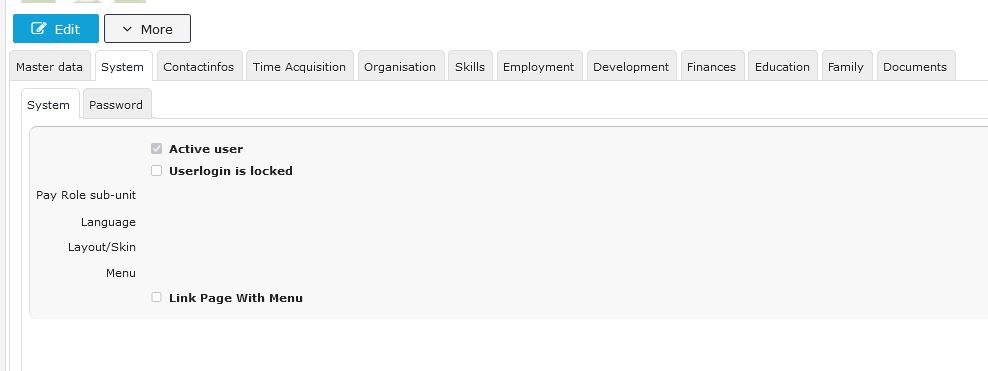
This tab offers the possibility for the HR admin to check whether an employee is active or locked and define the system settings for this employee.
An active user can be identified by a check mark in the Checkbox, if this is missing, the employee cannot log on to the Personalwolke. This can happen if the password has been entered incorrectly more than 5 times.
In order to deny any access to the Personalwolke to an exited employee, the user access can additionally be blocked by checking the checkbox "User access blocked".
If employees use a certain abbreviation within the company, this can be entered in the text field Payroll Indicator.
In order to The "System" form gives you, as HR admin, the option to record the employee's system settings.
At a glance, you can see whether an employee has full or restricted access, or is locked in the system.
A check mark next to the "Active user" field indicates that the employee has unrestricted access within the functions you have defined.
If the check mark is missing, access to the Personalwolke was locked because the wrong password was entered five times. (How to proceed in this case is shown in the "Password" tab.)
If it is necessary to revoke all access rights from an employee, for example because they have left the company, check the box "User access blocked". The block takes effect immediately.
Under Payroll indicator, an internal abbreviation can be noted for the respective employee.
To make working with the Personalwolke as pleasant and varied versatile as possible, it is possible to set the preferred language of the employee by using the the employee's preferred language can be set using a selection list. If desired, it is also possible to switch you can also choose between responsive and classicfor the layout/skin under Layout/Skin. For responsive, the menu variants Desktop or Mobile menu is are also available.
If Checking the option "Link page with menu" is checked, a logged in employee can see in the menu where the just causes the menu to show the logged-in employee where the currently displayed page of the Personalwolke can be found again.
Details to on the individual fields can be found under: under System Field Index

 erste


 Vergleiche Versionen 5 und 6

