Allgemeines zu Organisationsstrukturen
Die Organisationsstruktur erlaubt eine Einteilung des Mandanten (Unternehmens) in Gruppen und ist hierbei das oberste organisatorische Element für alle Gruppen, welche denselben Typ haben. Meist ist hierbei von hierarchischen Strukturen, wie z.B. dem Organigramm die Rede. Die hierarchischen Strukturen spielen bei der Abfrage div. Listen und Darstellungen eine wesentliche Rolle (z.B. Abfrage eines Anwesenheitstableaus, Managementlisten
General Information on Organizational Structures
The organizational structure allows a client (company) to be divided into groups and is the top-level organizational element for all groups of the same type. This usually refers to hierarchical structures, such as the organizational chart. The hierarchical structures play an essential role when querying various lists and views (e.g. querying an attendance board, management lists, ...). Es können aber auch Organisationsstrukturen angelegt werden, welche in keiner hierarchischen Beziehung zueinander stehen, wie z.B. lose Gruppen oder Kostenstellen.
Ein Organisationsstruktur hat eine der folgenden Organisationstypen zugeordnet:
-
hierarchische Aufbauorganisation
-
Lose Gruppen
-
Projektgruppen
-
Kostenstellen
Die hierarchische Aufbauorganisation wird in einem Organigramm des Unternehmens (Mandanten) dargestellt. Diese Hierarchie bestimmt die Beziehungen der Gruppen (Abteilungen) zueinander. Hierzu kann eine oberste Gruppe in der Organisationsstruktur definiert werden (z.B. Vorstand). Weiters bestimmen übergeordnete bzw. untergeordnete Gruppen (Einteilung im Menüpunkt Gruppen) das Aussehen des Organigramms und das verhalten der Gruppen zueinander. Eine Person kann zu einem Zeitpunkt nur einer hierarchischen Gruppe angehören (jedoch zusätzlich auch noch Mitglied in diversen Projektgruppen, losen Gruppen oder Kostenstellen sein).
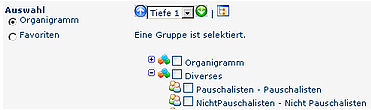
Der Organisationstyp "lose Gruppe" dient für Gruppen ohne einen systematischen Organisationszweck. D.h. es bestehen keine Beziehungen darin definierten Gruppen zueinander und die Gruppen sind auch nicht für die Zwecke Aufbauorganisation, Ablauforganisation oder Kostenstellen gedacht. Beispiele für solche Gruppen ergeben sich aus den Notwendigkeiten einzelner Anwendungsmodule, die Mitarbeiter nach verschiedensten Kriterien zu gruppieren, z.B. Teilzeitmitarbeiter, aktive / ausgetretene Mitarbeiter, Pauschalisten o.a.
Diese Gruppen werden in der Auswahl der Organisationseinheiten bei den Standardreports optional mitangezeigt und können so als alternative Selektionskriterien - neben den klassischen Merkmalen wir Abteilunge, Team, etc. - verwendet werden. Bei den losen Gruppen besteht keine hierarchische Beziehung der Gruppen zueinander. Ein Mitarbeiter kann zu mehreren losen Gruppen zugeordnet sein, oder man stellt eine singuläre Gruppenzugehörigkeit sicher, d.h. der Mitarbeiter kann dann nur einer dieser Organisationsstrukturen zugeordnet sein.
Die Projektgruppen funktionieren im Prinzip genauso wie die losen Gruppen. Die Unterteilung zwischen Losen Gruppen und Projektgruppen erlaubt eine saubere thematische Trennung.
Bei der Gruppierung der Mitarbeiter nach Kostenstellen wird u.a. definiert, wer welche Kosten für welche Ausgaben übernimmt. Sinnvoll ist die Einteilung nach Kostenstellen beispielsweise bei Dienstreiseabrechnungen oder bei der elektronischen Essensbestellung. Hier besteht die Möglichkeit, die Mitarbeiter entsprechend in definierten Kostenstellen zusammenzufassen (unabhängig von der hierarchischen Zuordnung). Die Kostenstellenstruktur funktioniert ähnlich wie die Aufbauorganisation jedoch ohne Hierarchie (d.h. ein Mitarbeiter kann zu einem Zeitpunkt nur einer (Stamm-)Kostenstelle zugeteilt sein.) Bei vielen unserer Kunden funktionieren die Kostenstellen wie Organisationseinheiten.
Während die Verwendung von Kostenstellen, Projektgruppen und losen Gruppen optional ist, muss zwingend eine hierarchische Aufbauorganisation für jeden Mandanten existierten, damit diesem Personen zugeordnet werden können!

Anlegen einer neuen Organisationsstruktur
Durch Klicken auf die Buttonleiste Neue Orgstruktur kann eine neue Organisationsstruktur (z.B. Abteilung, Gruppe) angelegt werden. Hierzu werden die Felder Name, Beschreibung ausgefüllt, der Mandant, Hierarchie Ja/Nein sowie der Organisationstyp ausgewählt.
Analog dem Anlegen eines neuen Mandanten kann auch hier der Name für eine Organisationsstruktur nur einmal vergeben werden. Im Falle einer Doppelanlegung erhält man vom System eine Fehlermeldung, dass eine Organisationsstruktur mit diesem Namen bereits existiert.
Merke: alle Felder, die mit einem Stern gekennzeichnet sind, sind Pflichtfelder und müssen befüllt werden.

NameName der neuen OrganisationsstrukturBeschreibungBeschreibung der neuen OrganisationsstrukturMandantHier erfolgt die Auswahl des entsprechende Mandanten, zu welchem die Organisationsstruktur zugeordnet werden soll (nur relevant bei mehreren Mandanten)Hierarchie Ja / NeinPro Mandanten kann nur eine hierarchische Organisationsstruktur zugewiesen werden. Ist dies der Fall, ist das Feld „Hierarchie“ ausgegraut und kann nicht bearbeitet werden. Wird für „Hierarchie“ der Wert „Ja“ gewählt, wird das Feld „Organisationstyp“ automatisch auf „1 – hierarchische Aufbauorganisation“ gesetzt. Wird „Nein“ selektiert, kann zwischen den drei Typen „1 - Kostenstelle“, „3 - Projektgruppen“ und „4 - Lose Gruppe“ gewählt werden. Singuläre Gruppenzugehörigkeit sicherstellen Ist diese Option aktiviert, so kann eine Person zu einem Zeitpunkt immer nur Mitglied EINER Gruppe dieser Orgstruktur sein. Weist man eine Person einer neuen Gruppe dieser Struktur zu, so wird die Zugehörigkeit zur bisherigen Gruppe automatisch beendet. Die gruppen verhalten sich dann ähnlich wie die hierarchischen Gruppen.Organisationstypabhängig von der hierarchischen Organisationsstruktur (siehe Punkt Hierarchie). Bestimmt das Verhalten, bzw. die Beziehung der Gruppen zueinander. 1. hierarchische AufbauorganisationEine hierarchische Aufbauorganisation muss vorhanden sein, damit die Workflow-Funktionalitäten genutzt werden können. Mit Hilfe der hierarchischen Aufbauorganisation wird das Unternehmensorganigramm aufgebaut. 2. Kostenstelle Bei diesem Punkt hat man die Möglichkeit, das Unternehmen nach Kostenstellen-Logik abzubilden; Mitarbeiter können mehreren Kostenstellen zugeordnet werden. 3. Projektgruppen Analog dem Punkt Kostenstelle wird das Unternehmen nach Projektgruppen-Logik abgebildet; auch hier können Mitarbeiter mehreren Projektgruppen zugeordnet sein. 4. lose Gruppen Erstellung von Gruppen, die individuell benötigt werden (Bsp. alle Mitarbeiter, die Vollzeit/Teilzeit arbeiten, Pauschalisten, Karenzen etc.)
Drücken Sie anschließend auf die Schaltfläche „Speichern & Schließen“ um zur Liste aller Mandanten zurückzukehren oder „Speichern“ falls Sie das Formular noch weiter editieren wollen.
Nach erfolgter Speicherung erhält man vom Server eine Bestätigung und gelangt zur Übersicht über zugeordnete Gruppen, bzw. Rollen. Da die Organisationsstruktur neu angelegt ist, sind ihr noch keine Gruppen, bzw. Rollen zugeordnet.
Bearbeiten / Wartung einer bestehenden Organisationsstruktur
Bei einer bestehenden Organisationsstruktur kann der Name derselben geändert werden.
Änderungen betreffend die HierarchiePro Mandanten kann nur eine hierarchische Organisationsstruktur zugewiesen werden. Ist dies der Fall, ist das Feld „Hierarchie“ ausgegraut und kann nicht bearbeitet werden. Wird für „Hierarchie“ der Wert „Ja“ gewählt, wird das Feld „Organisationstyp“ automatisch auf „1 –hierarchische Aufbauorganisation“ gesetzt. Wird „Nein“ selektiert, kann zwischen den drei Typen „1 - Kostenstelle“, „3 - Projektgruppen“ und „4 - Lose Gruppe“ gewählt werden.
Die bestehende oberste Gruppe in Struktur kann ebenfalls geändert werden. Dazu aktiviert man durch anklicken die Checkbox neben der gewünschten obersten Gruppe. Die oberste Gruppe ist allen anderen Gruppen in der Organisationsstruktur übergeordnet.
Löschen einer Organisationsstruktur
Möchte man eine bestehende Organisationsstruktur löschen, so ist das nur möglich, wenn dieser keine Untereinheiten zugeordnet sind.
Die betreffende Orgstruktur wird mit Hilfe des Editiericons ausgewählt, anschließend klickt man auf die "Löschen" - Schaltfläche und erhält noch einen Sicherheitscheck in Form eines Popups. Durch bestätigen des OK-Buttons wird die Organisationsstruktur gelöscht, und scheint nicht mehr in der Übersicht auf:

Nach erfolgter Löschung erhält man eine Bestätigung des Servers.
Verweise
However, organizational structures that have no hierarchical relationship to each other can also be created, such as loose groups or cost centers.
An organizational structure is assigned one of the following organization types:
-
Hierarchical organization
-
Loose groups
-
Project groups
-
Cost centers
The hierarchical organization is represented in an organizational chart of the company (client). This hierarchy determines the relationships of the groups (departments) to each other. A top-level group can be defined in the organizational structure (e.g. Board). In addition, superordinate and subordinate groups (assignment in the Groups menu item) determine the appearance of the organizational chart and the behavior of the groups toward each other.
A person can belong to only one hierarchical group at a time (but can additionally be a member of various project groups, loose groups or cost centers).
The organization type "loose group" is intended for groups without a systematic organizational purpose. That is, there are no relationships between the groups defined within it, and the groups are also not intended for the purposes of hierarchical organization, process organization or cost centers. Examples of such groups arise from the needs of individual application modules to group employees by a wide variety of criteria, e.g. part-time employees, active / former employees, flat-rate employees or similar.
These groups are optionally displayed in the selection of organizational units in the standard reports and can thus be used as alternative selection criteria - in addition to the classic attributes such as department, team, etc.
Loose groups have no hierarchical relationship to each other. An employee can be assigned to several loose groups, or you can ensure single group membership, i.e. the employee can then be assigned to only one of these organizational structures.
The project groups work in principle in exactly the same way as the loose groups. The distinction between loose groups and project groups allows a clean thematic separation.
When grouping employees by cost centers, it is defined, among other things, who bears which costs for which expenses. Division by cost centers makes sense, for example, for business trip expense reports or electronic meal ordering. Here you have the option of grouping the employees accordingly in defined cost centers (independent of the hierarchical assignment). The cost center structure works similarly to the hierarchical organization but without a hierarchy (i.e. an employee can be assigned to only one (primary) cost center at a time.) For many of our customers, the cost centers function like organizational units.
While the use of cost centers, project groups and loose groups is optional, a hierarchical organization must exist for every client so that persons can be assigned to it!
Creating a New Organizational Structure
By clicking New org structure in the button bar, a new organizational structure (e.g. department, group) can be created. To do so, fill in the fields Name and Description, and select the client, Hierarchy Yes/No and the organization type.
As when creating a new client, the name of an organizational structure can be assigned only once. In case of a duplicate, the system displays an error message that an organizational structure with this name already exists.
Note: All fields marked with an asterisk are required fields and must be filled in.
-
Name
Name of the new organizational structure
-
Description
Description of the new organizational structure
-
Client
Select the client to which the organizational structure is to be assigned (only relevant with multiple clients)
-
Hierarchy Yes / No
Only one hierarchical organizational structure can be assigned per client. If this is the case, the field "Hierarchy" is grayed out and cannot be edited. If the value "Yes" is selected for "Hierarchy", the field "Organization type" is automatically set to "1 - hierarchical organization". If "No" is selected, you can choose between the three types "1 - Cost center", "3 - Project groups" and "4 - Loose group".
-
Ensure single group membership
If this option is activated, a person can be a member of only ONE group of this org structure at a time. If you assign a person to a new group of this structure, membership in the previous group is ended automatically. The groups then behave similarly to the hierarchical groups.
-
Organization type
Depends on the hierarchical organizational structure (see the item Hierarchy). Determines the behavior of, and the relationship between, the groups.
-
1. Hierarchical organization
A hierarchical organization must exist so that the workflow functionalities can be used. The hierarchical organization is used to build the company organizational chart.
-
2. Cost center
This option lets you model the company according to cost center logic; employees can be assigned to several cost centers.
-
3. Project groups
Analogous to the cost center item, the company is modeled according to project group logic; here too employees can be assigned to several project groups.
-
4. Loose groups
Creation of groups that are needed individually (e.g. all employees who work full-time/part-time, flat-rate employees, parental leave, etc.)
Then click the "Save & Close" button to return to the list of all clients, or "Save" if you want to continue editing the form.
After saving, you receive a confirmation from the server and are taken to the overview of assigned groups and roles. Since the organizational structure is newly created, no groups or roles are assigned to it yet.
Editing / Maintaining an Existing Organizational Structure
For an existing organizational structure, its name can be changed.
Changes regarding the hierarchy
Only one hierarchical organizational structure can be assigned per client. If this is the case, the field "Hierarchy" is grayed out and cannot be edited. If the value "Yes" is selected for "Hierarchy", the field "Organization type" is automatically set to "1 - hierarchical organization". If "No" is selected, you can choose between the three types "1 - Cost center", "3 - Project groups" and "4 - Loose group".
The existing top-level group in the structure can also be changed. To do so, click to activate the checkbox next to the desired top-level group. The top-level group is superordinate to all other groups in the organizational structure.
Deleting an Organizational Structure
An existing organizational structure can be deleted only if no subordinate units are assigned to it.
Select the org structure in question using the edit icon, then click the "Delete" button and a confirmation popup appears as a safety check. Confirming with the OK button deletes the organizational structure, and it no longer appears in the overview:
After deletion, you receive a confirmation from the server.
References
Job Build Custom Groups
 erste
erste


