Veränderungen des Inhalts
Klicken Sie für eine detaillierte Beschreibung auf die geänderten Stellen:
Benutzen sie die linke oder die rechte Maustaste, um zur jeweils vorherigen bzw. nachfolgenden Änderung zu gelangen.
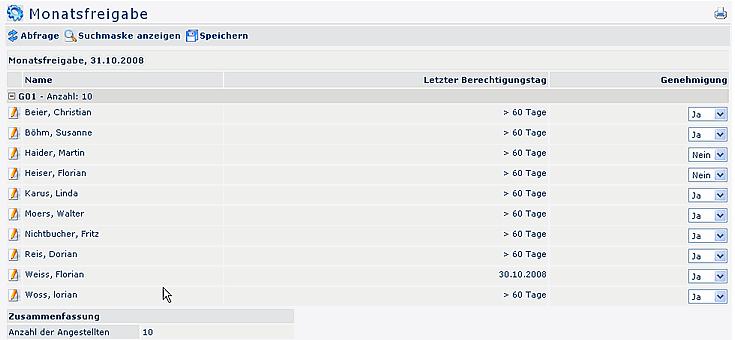
After the employees have checked and cleared their journals, the executive staff gets an overview, and a tool to check those journals, and make a final clearing him/herself.
The selection of the requested units/departments is operated either via the organigramm the organigramm or the favourits-list. For detailed
For detailed desription of handling, please see chapter see chapter >> Management.
The system adminsitrator may also assign authorisations for the access to the journals of your employees. In this case you will see the journal-icon next to the employees name. A click on the journal-symbol will get you in the actual monthly journal of the respective employee.

-
day of last authorisation/clearing
This field displays, when the user has revised and clearing and clearing his journal
-
Approval
In this column you have the possibility to clear the yournal (after previous revision), by selecting "Yes". This parameter sets an authorisation ini the time-management system, anabling a further editing, e.g. through the HR-department.
Attention: the date selection always refers to the ultimo of the previous month. Example: if your selection shows the 7the 7.11, so the list will deliver all monthly clearings until the 31.10.; if your selection is the 16the 16.10., the list delivers all clearing until 30.09.
 erste
erste


 Vergleiche Versionen 1 und 2
