Veränderungen des Inhalts
Klicken Sie für eine detaillierte Beschreibung auf die geänderten Stellen:
Benutzen sie die linke oder die rechte Maustaste, um zur jeweils vorherigen bzw. nachfolgenden Änderung zu gelangen.
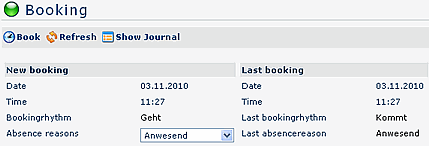
The booking mask allows you to perform on-line time-bookings.
In this process the system transfers time and date and date from the web server, it also provides the correct booking-rhythm (comes / leaves). Additionally you can also book various absence reasons, e.g. official absence, etc.
A message field allows you to post a note/message, such as "In a meeting until 12:00", "customer visit at XYZ", etc.
This message is displayed in the attendance tableau, and can be viewed by other colleagues.
The The "Show Journal" button button can be used to provide an overview over the monthly journal.
To hide the journal, click on the "Hide Journal" button, which appears automatically after automatically after clicking on the "Show Journal" button.
A successful time-booking is quitted with a with a server message, in case of non-conformance an adequate error-message will appear.
Links
Configuration for the system administrator
 erste
erste


 Vergleiche Versionen 4 und 5
