Veränderungen des Inhalts
Klicken Sie für eine detaillierte Beschreibung auf die geänderten Stellen:
Benutzen sie die linke oder die rechte Maustaste, um zur jeweils vorherigen bzw. nachfolgenden Änderung zu gelangen.
The absence form is intended as a vehicle to enter planned (part / full-time) absence reasons into the time system, in accordance with the defined work-flow process.
An activated deputy settlement demands for the nomination of a colleague (deputy), who will act in place during the absence period.
The deputy will receive all application forms (To Dos), which guarantees, that all assigned duties (To Dos) will be transferred and completed.
-
From - until date
Duration of the intended absence
-
Absence reason
Select the respective absence reason (holidays, special leave, compensatory time, ...)
-
Mode of absence reasons
Select the respective mode: half- or full day
-
Replenish target time
This parameter will replenish the absence-time to the target time (relevant for allocation in the time management, e.g. at seminars)
-
Comment
Enter a comment (containing ev. useful information for the person next in process)
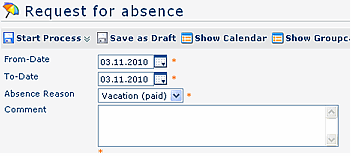
The personal calendar may be a useful help, just like the group calendar. Both can provide an overview over the absence-planning within your team.
To hide the calendar, click on the "Hide calendar" button.
You can start the form either form either directly, by a click on the "Start process" button, or save it as it as a draft for further editing, by clicking on clicking on the "Save as draft" button. For detailed
For detailed description of handling, please see chapter see chapter > Requests.
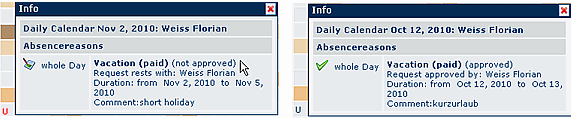
As long as the process is in progress (status not approved), the absence reason will be entered into the system, but marked in red colour.
After the approval, the absence reason is marked in blue colour, all other relevant data (e.g. remaining vacation, planned vacation) will be updated.

A click on the U- symbol provides detailed information concerning the absence. Here you find the examples , both for a not yet approved (left side), and for an already approved absence application (right):
.
Links
Konfiguration für den Administrator
 erste
erste


 Vergleiche Versionen 3 und 4
