Veränderungen des Inhalts
Klicken Sie für eine detaillierte Beschreibung auf die geänderten Stellen:
Benutzen sie die linke oder die rechte Maustaste, um zur jeweils vorherigen bzw. nachfolgenden Änderung zu gelangen.
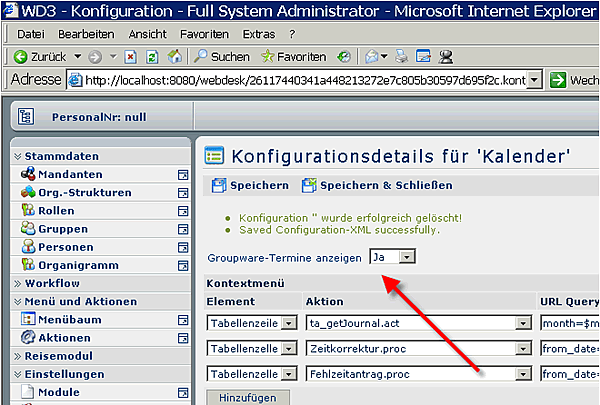
Action configurations for GW access:
Those actions in which a groupware server is to be accessed must be enabled initially. The following actions are available:

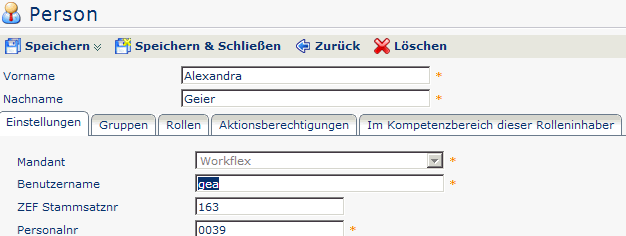
Mapping "Webdesk persons" to "groupware persons"
To determine the correct mailbox or mail file for each Webdesk user, the "key" must be entered in the Webdesk person master data under "User name" (database field name "userName"). This key must match a user in the groupware system (for Exchange, for example, this would be the NT user name).

The following system parameters specify for which persons a GW connection is (not) to be provided:
-
groupsToCheck: specifies the groups to be included in GW queries (a plus sign before the group means that its subgroups are included as well, e.g. +Personnel; * = all groups are included)
-
personsNotToCheck: specifies which persons are to be excluded from GW queries (enter user names)
For MS Exchange, the user data required for communication (home server, mailbox/file name, etc.) is determined exclusively via LDAP. For Lotus Domino, it is determined either via LDAP or via the web service that is required anyway (configured via a system parameter - see below).
The connection data determined initially is kept in the cache until the web server is restarted (ehCache parameter diskPersistance = false).
If the mapping of a person in Webdesk and/or in the groupware system changes, the cache can be reset in the following ways:
- Restart the Webdesk server
- Run the "Clear groupware cache" function under "Advanced functions"
Effects on time actions
Entered appointments are marked with a blue triangle and can be queried or displayed in the following actions:
Personal annual calendar
Group calendar
Personal appointment calendar
The personal appointment calendar displays all entered appointments and absences in a monthly overview.
Attendance board
If appointments are entered for the queried day, the bar showing the groupware appointments is marked red for the corresponding time.
If no appointments are entered, the bar is displayed in green.
 erste
erste


 Vergleiche Versionen 1 und 2