Veränderungen des Inhalts
Klicken Sie für eine detaillierte Beschreibung auf die geänderten Stellen:
Benutzen sie die linke oder die rechte Maustaste, um zur jeweils vorherigen bzw. nachfolgenden Änderung zu gelangen.
General Information
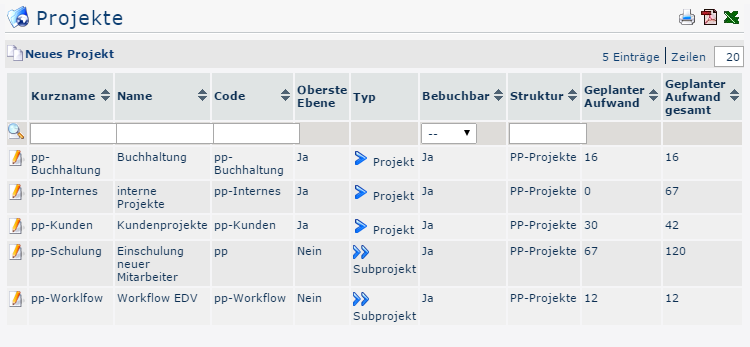
Under the menu item Projects, you will find an overview of all projects created for the client (company).

-
Short name
This is the abbreviation of the project, including the fixed prefix that stands for the client (e.g., pp for PersonalwolkeProfessional)
-
Name
The freely chosen, descriptive name under which the project runs
-
Code
In this case, the code is the same as the short name - after the prefix, however, any freely chosen combination of letters and numbers could be used.
-
Top level
Indicates whether the project is at the top of the hierarchy as a project (Yes) or is subordinate as a subproject (No)
-
Type
This again refers to the hierarchical division into projects (marked with  ) and subprojects (marked with
  )
)
-
Bookable
This column indicates whether users can book project time to the corresponding project (Yes) or not (No)
-
Structure
This means the path under which the respective project can be found. It also begins with the prefix.
-
Planned effort
This is the planned time in hours assumed for this project (optional)
-
Total planned effort
This means the time in hours assumed for this project including all of its subprojects.
For the project Customer Projects, this value is the sum of the planned effort for Customer Projects and the planned effort of its subproject, Workflow EDV
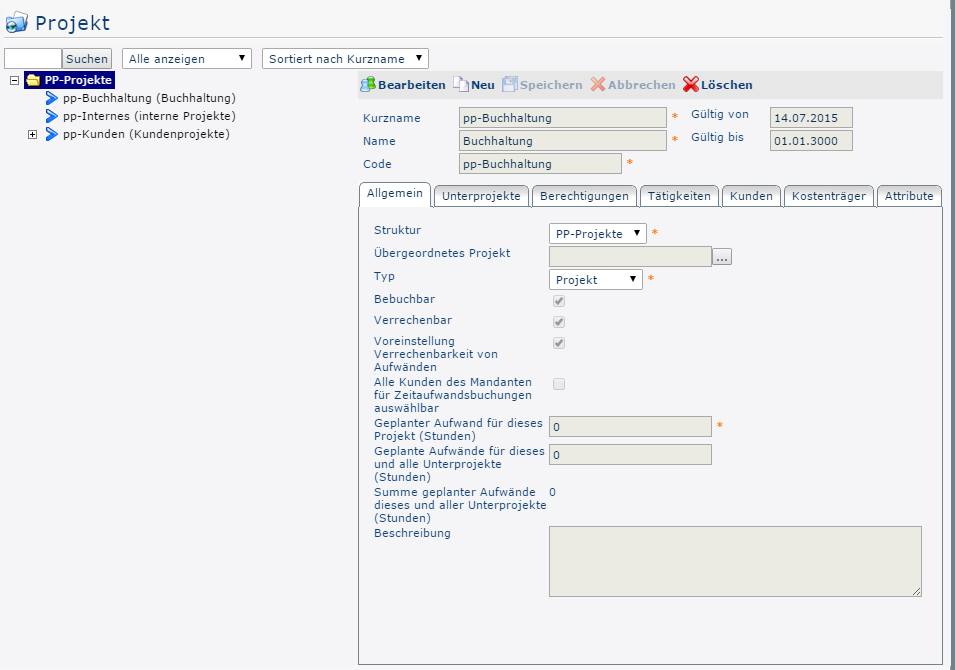
Project Master Data Sheet
Clicking the edit icon 
 takes you to the project master data sheet, where you can change data about the project / delete projects / create new projects. An explanation of the individual fields and tabs can be found under New Project.


Sorting / Search Options
This list can be sorted freely in ascending or descending order using the blue triangles ( ) and by a variety of criteria (short name, name, code, top level, type, bookable, structure, planned effort, total planned effort).
In addition, the white text fields at the top of the list let you restrict the displayed records by various criteria, e.g., short name "bu" shows only projects whose short name contains "bu" (enter "bu" in the text field and start the search by pressing Enter or clicking 
 ). To make all records visible again, simply delete the search term from the corresponding field and press Enter again or click
  .
.


Practical Functions
Clicking one of the 3 icons 
 in the upper right area opens the following dialog box, where you can specify in more detail the data to be shown in the selected medium (print, PDF, Excel):
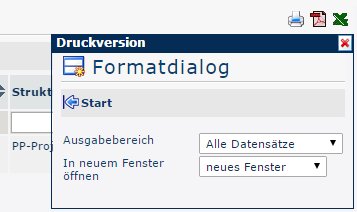

Output range
-
All records
All projects of the company are shown in the selected output medium.
-
Current section
Only the projects of the company currently displayed are shown in the selected output medium
Open in new window
-
New window
The selected records are displayed in a new window
-
Current window
The selected records are displayed in the current window
This function is also handy if you want to export a list of projects, possibly filtered by various criteria. The Excel format is a good choice for this.

 erste
erste


 Vergleiche Versionen 7 und 8