Organizational Structure
General Information on Organizational Structures
The organizational structure allows a client (company) to be divided into groups and is the top-level organizational element for all groups of the same type. This usually refers to hierarchical structures, such as the organizational chart. The hierarchical structures play an essential role when querying various lists and views (e.g. querying an attendance board, management lists, ...). However, organizational structures that have no hierarchical relationship to each other can also be created, such as loose groups or cost centers.
An organizational structure is assigned one of the following organization types:
- Hierarchical organization
- Loose groups
- Project groups
- Cost centers
The hierarchical organization is represented in an
organizational chart of the company (client). This hierarchy determines the
relationships of the groups (departments) to each other. A top-level
group can be defined in the organizational structure (e.g. Board). In addition,
superordinate and subordinate groups (assignment in the Groups menu item)
determine the appearance of the organizational chart and the behavior of the groups toward each other.
A person can belong to only one hierarchical group at a time
(but can additionally be a member of various project groups, loose groups
or cost centers).
The organization type "loose group" is intended for groups without a systematic organizational purpose. That is, there are no relationships between the groups defined within it, and the groups are also not intended for the purposes of hierarchical organization, process organization or cost centers. Examples of such groups arise from the needs of individual application modules to group employees by a wide variety of criteria, e.g. part-time employees, active / former employees, flat-rate employees or similar.
These groups are optionally displayed in the selection of organizational units in the
standard reports and can thus be used as alternative
selection criteria - in addition to the classic attributes such as department, team, etc.
Loose groups have no hierarchical relationship to each other. An employee can be assigned to several loose groups, or
you can ensure single group membership, i.e. the employee
can then be assigned to only one of these organizational structures.
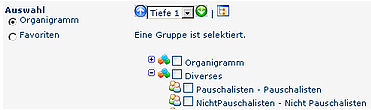
The project groups work in principle in exactly the same way as the loose groups. The distinction between loose groups and project groups allows a clean thematic separation.
When grouping employees by cost centers, it is defined, among other things, who bears which costs for which expenses. Division by cost centers makes sense, for example, for business trip expense reports or electronic meal ordering. Here you have the option of grouping the employees accordingly in defined cost centers (independent of the hierarchical assignment). The cost center structure works similarly to the hierarchical organization but without a hierarchy (i.e. an employee can be assigned to only one (primary) cost center at a time.) For many of our customers, the cost centers function like organizational units.
While the use of cost centers, project groups and loose groups is optional, a hierarchical organization must exist for every client so that persons can be assigned to it!
Creating a New Organizational Structure
By clicking New org structure in the button bar, a new organizational structure (e.g. department, group) can be created. To do so, fill in the fields Name and Description, and select the client, Hierarchy Yes/No and the organization type.
As when creating a new client, the name of an organizational structure can be assigned only once. In case of a duplicate, the system displays an error message that an organizational structure with this name already exists.
Note: All fields marked with an asterisk are required fields and must be filled in.
-
Name
Name of the new organizational structure -
Description
Description of the new organizational structure -
Client
Select the client to which the organizational structure is to be assigned (only relevant with multiple clients) -
Hierarchy Yes / No
Only one hierarchical organizational structure can be assigned per client. If this is the case, the field "Hierarchy" is grayed out and cannot be edited. If the value "Yes" is selected for "Hierarchy", the field "Organization type" is automatically set to "1 - hierarchical organization". If "No" is selected, you can choose between the three types "1 - Cost center", "3 - Project groups" and "4 - Loose group". -
Ensure single group membership
If this option is activated, a person can be a member of only ONE group of this org structure at a time. If you assign a person to a new group of this structure, membership in the previous group is ended automatically. The groups then behave similarly to the hierarchical groups. -
Organization type
Depends on the hierarchical organizational structure (see the item Hierarchy). Determines the behavior of, and the relationship between, the groups. -
1. Hierarchical organization
A hierarchical organization must exist so that the workflow functionalities can be used. The hierarchical organization is used to build the company organizational chart. -
2. Cost center
This option lets you model the company according to cost center logic; employees can be assigned to several cost centers. -
3. Project groups
Analogous to the cost center item, the company is modeled according to project group logic; here too employees can be assigned to several project groups. -
4. Loose groups
Creation of groups that are needed individually (e.g. all employees who work full-time/part-time, flat-rate employees, parental leave, etc.)
Then click the "Save & Close" button to return to the list of all clients, or "Save" if you want to continue editing the form.
After saving, you receive a confirmation from the server and are taken to the overview of assigned groups and roles. Since the organizational structure is newly created, no groups or roles are assigned to it yet.
Editing / Maintaining an Existing Organizational Structure
For an existing organizational structure, its name can be changed.
Changes regarding the hierarchy
Only one hierarchical organizational structure can be assigned per client. If this is the case, the field "Hierarchy" is grayed out and
cannot be edited. If the value
"Yes" is selected for "Hierarchy", the field "Organization type" is automatically set to
"1 - hierarchical organization". If "No" is
selected, you can choose between the three types "1 - Cost center", "3 -
Project groups" and "4 - Loose group".
The existing top-level group in the structure can also be changed. To do so, click to activate the checkbox next to the desired top-level group. The top-level group is superordinate to all other groups in the organizational structure.
Deleting an Organizational Structure
An existing organizational structure can be deleted only if no subordinate units are assigned to it.
Select the org structure in question using the edit icon, then click the "Delete" button and a confirmation popup appears as a safety check. Confirming with the OK button deletes the organizational structure, and it no longer appears in the overview:
After deletion, you receive a confirmation from the server.
Keine Kommentare vorhanden.