Veränderungen des Inhalts
Klicken Sie für eine detaillierte Beschreibung auf die geänderten Stellen:
Benutzen sie die linke oder die rechte Maustaste, um zur jeweils vorherigen bzw. nachfolgenden Änderung zu gelangen.
The calendar provides an useful overview for the planning of part/full-time absences (holidays, seminars, illness, ...).
Already submitted and approved absences will be shown in blue colour, submitted, but not yet approved absences in red colour. Saturdays are marked in a light yellow, Sundays in dark yellow colour. Red marked days are flagged as holidays.
The The arrow-button allows you to scroll into the future or past.
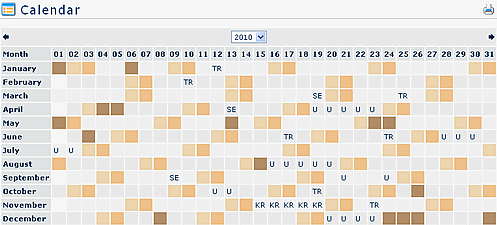
A click A click on an absence reason, opens a detailed info display:
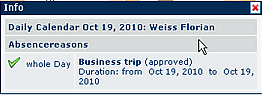
.
When a request, e.g. for holidays has been approved, the system automatically inserts the absence (as a whole day absence) into the Lotus the Lotus Notes calendar.
Since the synchronisation runs only once a day, it may happen, that the absence will appear will appear in the Lotus Notes calender on calender on the next day..
Already recorded appointments are marked with a small rectangle on the specified date. By clicking on the rectangle you will receive information concerning information concerning the appointment.
Attention: Appointments (calendar entries) from the Groupware-System (Notes or Exchange) are only available, with an activated Calendaring Module.
Links
Konfiguration für den Administrator
 erste
erste


 Vergleiche Versionen 4 und 5
